
Appearance
BlueFox Email vs Mailchimp: Head-to-Head Comparison
BlueFox Email and Mailchimp solve overlapping problems but take very different approaches. Mailchimp is a broad marketing suite with email at the center; BlueFox Email is a focused email platform with managed sending built in and an optional bring-your-own AWS SES mode. Neither is "better" in the abstract: the right choice depends on what you need from the tool.
This comparison covers design, integrations, automation, deliverability, personalization, segmentation, analytics, support, and pricing. Each section lists what each platform does, where it's strong, and what it trades off. Numbers reflect public pricing and documentation as of September 2026.
Platform Positioning
Mailchimp is a marketing suite. Email is core, but the product also covers landing pages, social posting, ad management, a basic CRM, SMS (US/Canada), and an e-commerce stack with Shopify/WooCommerce/BigCommerce sync. It serves 11M+ users globally per Mailchimp's own current figures (the ~13 million figure still repeated across many third-party review sites traces back to 2021 acquisition-era data that was never updated), which translates to a large template library, an active agency/freelancer ecosystem, and broad tutorial coverage. The trade-off is breadth over depth: contact-based pricing scales aggressively, several features are gated behind higher tiers, and the free tier has been progressively reduced. The Classic Automation Builder was retired on June 1, 2025, removing multi-step automation from the free plan; in January 2026, the free plan's contact cap was further reduced to 250 contacts and 500 sends per month.
BlueFox Email is a focused email platform. It offers two delivery modes: a managed infrastructure option where projects start in sandbox and move to production after a review (no AWS account required), and an optional BYO AWS SES mode for teams who want to use their own AWS account and keep their own sending reputation. The product covers campaigns, transactional, triggered emails, automations, sign-up forms, segments, suppression lists, and a subscription preferences page, but it does not offer landing pages, social, ads, CRM, or SMS. Pricing is per-send rather than per-contact, with monthly plans from $6/month (excl. VAT) or one-time send packs, and all features are available on every plan including the free tier. The trade-off is a smaller ecosystem: fewer pre-built templates, fewer marketplace integrations, smaller community, and a younger product overall.
The two are not direct substitutes. Mailchimp suits teams that want one tool for multi-channel marketing. BlueFox Email suits teams that want focused email sending, either fully managed or on top of their own AWS SES, with predictable per-send costs.
Email Design and Templates
Mailchimp
Mailchimp ships a drag-and-drop builder with 100+ pre-designed templates on paid plans and pre-built content blocks for images, text, video, and social embeds. Brand asset management keeps colors, fonts, and logos consistent across campaigns. Mobile-responsive previews show how emails render on different devices. Higher tiers add Intuit Assist (Write with AI for generative email copy, Content Optimizer for readability and length suggestions), brand-kit-driven design generation in the campaign builder (the standalone Creative Assistant tool was retired on December 17, 2025; the underlying AI design generation is now folded into the template/campaign creation flow), stock photo and Giphy integration, and dynamic content blocks.
Strengths: large template library, mature brand kit, generative AI for email copy via Intuit Assist on paid plans, broad stock-asset integration.
Trade-offs: Outlook rendering is inconsistent on some templates, deeper customization typically requires HTML, free-tier template variety is limited, and several visual designs have aged.
BlueFox Email
BlueFox Email uses the Chamaileon SDK for its drag-and-drop builder. The editor offers a built-in stock photo gallery, a photo editor, a shared image library for brand assets, custom font uploads, dark mode preview, and a library of pre-designed starter templates (a smaller selection than Mailchimp's, but covering the common newsletter, announcement, and transactional layouts). Reusable components (blocks, themes, templates) are first-class. Designers build a brand system once and reuse it across campaigns, transactional, and triggered emails. Cross-client rendering covers Gmail, Outlook, Apple Mail, and mobile. The Dynamic Image block pairs with data feeds to render images sourced from RSS/JSON at send time.
Strengths: reusable design system, built-in stock photo gallery and photo editor, data-feed-driven dynamic content, cross-client rendering.
Trade-offs: smaller starter-template library than Mailchimp's 100+ catalog, no AI design generation.

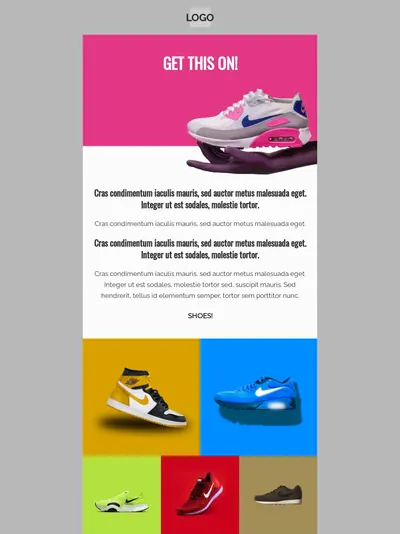
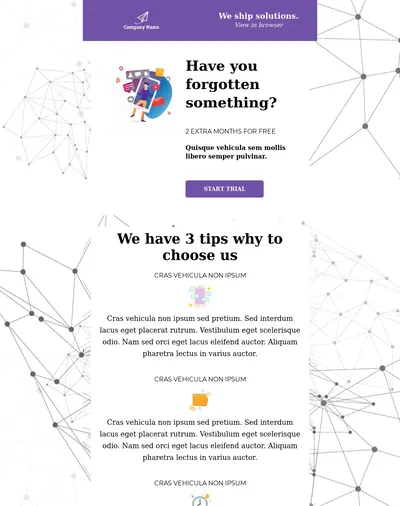
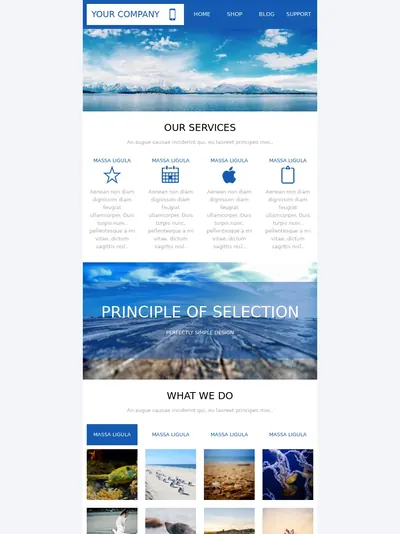
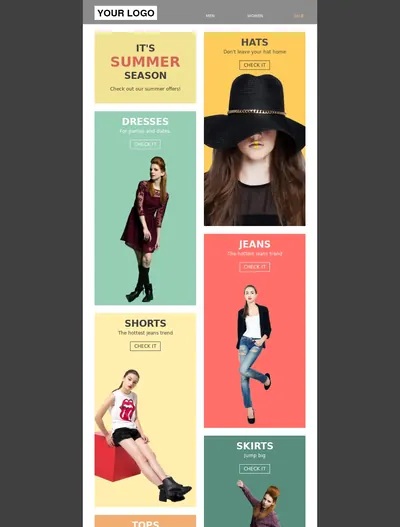
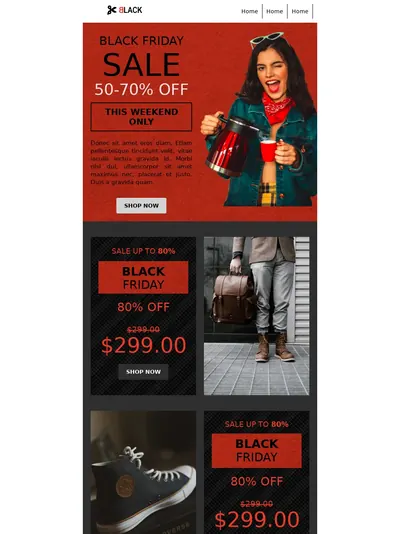

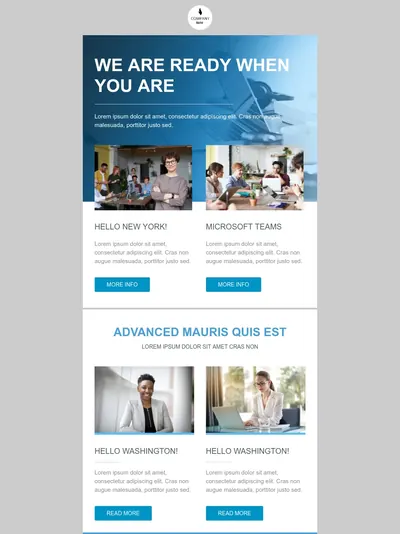

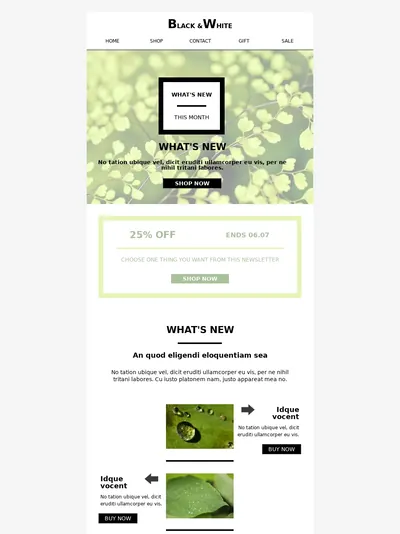
Template 1 of 10: Marketing Agency Newsletter
Integrations
Mailchimp
Mailchimp's marketplace lists 300+ native integrations, plus Zapier for broader connectivity. Notable native categories: e-commerce (Shopify, WooCommerce, BigCommerce, Magento) with cart sync and product feeds, payment (Stripe, Square, QuickBooks), CRM (HubSpot, Salesforce, Pipedrive), design (Canva), and CMS (Squarespace, WordPress). Marketing API webhooks cover audience events (subscribe, unsubscribe, profile update); Transactional API webhooks cover send, bounce, delivered, open, click, spam, reject. OAuth2 is supported, and is in fact required for any integration that wants to join Mailchimp's Integration Partner Program and get listed in the Marketplace.
Strengths: large native marketplace, mature e-commerce sync, OAuth2 partner program.
Trade-offs: Marketing API webhooks require Standard or higher to enable (Free and Essentials can view the setting but not activate it). Some marketplace apps charge separately. Transactional webhooks require the Mandrill add-on.
BlueFox Email
BlueFox Email exposes an API for contacts, subscriptions, transactional sends, and triggered sends. Webhooks push real-time events: sent, failed, opens, clicks, bounces, complaints, and subscription events (subscribe, unsubscribe, pause, resubscribe). Direct integrations: Supabase for auth emails (signup confirmation, magic links, password reset, email address changes, reauthentication, and invitations) and Zapier with six triggers (New Contact, Contact Updated, Contact Deleted, New Subscription, Unsubscribed, Subscription Paused) and eight actions covering sending and contact/subscription management. There's also a local MCP server that lets AI agents such as Claude, Cursor, or Windsurf manage a project through 52 tools. In BYO SES mode, the user keeps direct AWS access for any SES-level integration.
Strengths: complete API on every plan, full webhook event set on every plan, Supabase-native auth email path covering all six Supabase email types, Zapier connectivity, MCP server for AI agents.
Trade-offs: small native marketplace (Supabase, Zapier, and the MCP server are the main first-party integrations), no native e-commerce platform sync, no native CRM connector, no native social/ads tooling.

Automation
Mailchimp
Mailchimp retired its Classic Automation Builder on June 1, 2025. All workflows now run in what Mailchimp calls Marketing Automation Flows. It's the same feature previously called Customer Journey Builder (CJB), so both names refer to identical functionality. It uses three component types: Triggers (events that add a contact to a flow), Rules (conditional path branching), and Actions (send email, send SMS, add tag, update field, send to integration). Pre-built journey templates cover welcome series, abandoned cart, post-purchase, win-back, and date-based campaigns. Standard and Premium plans add Intuit Assist content suggestions and predictive targeting (purchase likelihood, customer lifetime value) on connected stores.
Strengths: large template gallery for common e-commerce and lifecycle journeys, native SMS action inside flows, AI content suggestions on paid plans, predictive segmentation on Standard and Premium.
Trade-offs: Marketing Automation Flows is paid-only. Free plan has had no multi-step automation since June 2025. Standard-tier flows are capped at 200 journey points per automation. A/B testing inside flows requires Standard or higher. Predictive features require Standard or Premium and a connected store.
BlueFox Email
BlueFox Email's automation builder is available on every plan including the free tier. Trigger types: Contact Added, Contact Updated (with from/to property conditions), Enter Segment, Leave Segment, and Time Based (runs on a recurring schedule: daily, weekdays, weekly, monthly, or monthly-on-the-nth-day against a whole subscriber list rather than firing off a single contact event). Node types: Send Email, Notify (send to a list or specific addresses rather than the flowing contact), Timer, Audience Filter (property, segment, or email activity), Branching with Condition nodes (multi-path), Set Value (update a contact property mid-flow), Manage Tags (add/remove tags), Webhook (fire an HTTP request to an external URL mid-flow, optionally carrying the running contact's data), and Complete (defined exit). Exit Criteria lets contacts leave the flow early based on property, segment, or email activity. Running flows can be updated and applied to upcoming-only or upcoming-and-in-progress contacts.
Strengths: all automation features on every plan, segment-based and schedule-based triggers, mid-flow contact property updates, email-activity-based branching (specific-link click matching), an in-flow webhook node for pushing activity to external systems, live editing of running flows.
Trade-offs: no SMS action, no AI content suggestions, no predictive targeting, fewer pre-built journey templates, no native e-commerce triggers (no abandoned cart, no purchase events). Those have to be wired via the API, the Webhook node, or Zapier.
Deliverability and Infrastructure
Mailchimp
Mailchimp uses shared IP pools by default. The platform's public position is that established shared IPs outperform freshly warmed dedicated IPs for most senders, and that's a defensible argument for low-to-mid volume senders. Authentication covers DKIM and DMARC for custom sending domains. Hard bounces and unsubscribes are handled automatically. Dedicated IPs for the marketing platform are typically available only on the Premium plan or through custom enterprise contracts negotiated with Sales. The Mandrill (Transactional Email) add-on, which runs on entirely separate infrastructure, offers a dedicated IP at $29.95/month with a built-in warmup schedule.
Strengths: mature shared-IP reputation, automatic bounce/unsubscribe handling, DKIM + DMARC support, IP warmup schedule on Mandrill dedicated IPs.
Trade-offs: no centralized deliverability dashboard, no visibility into spam complaint data, no built-in list validation, no direct access to deliverability specialists. Return-path uses Mailchimp's own domain by default, so SPF alignment isn't automatic. Dedicated IPs on the marketing platform require Premium-tier or enterprise pricing, not a self-serve add-on.
BlueFox Email
BlueFox Email has three delivery modes documented in Delivery Modes:
- Sandbox (default for new projects, BlueFox-managed infrastructure): send to any recipient with no verified-recipient requirement, capped at 100 emails/day and 1 email/second. No AWS account required. Sends from
no-reply@bluefoxemailsandbox.comby default, though a verified custom domain can be used here too. - Production (BlueFox-managed infrastructure, after a review): your approved monthly sending volume, usually set to match what you request on the production application (accounts still building a track record can start lower), with limit increases available on request plus custom sender identities and your own verified domain.
- BYO AWS SES (optional): connect your AWS account via direct credentials or STS Role ARN. Required permissions:
ses:SendEmail,ses:SendRawEmail,ses:ListIdentities,ses:GetSendQuota. You keep your own AWS sending reputation and IP isolation, and can use your AWS SES dedicated IP if configured there.
To stay in production, projects must maintain bounce rate below 2.5% and complaint rate below 0.05%, shown live in the project dashboard. Bounced and complained addresses are added to a per-project suppression list automatically, and teams can also manually add or CSV-import other problematic addresses to prevent re-sending. An optional dedicated IP add-on is also available for managed sending at $50/month (excl. VAT), requested by email. On BYO AWS SES, dedicated IPs are set up directly through AWS on the customer's own account rather than through BlueFox.
Strengths: managed-mode + BYO-SES choice on the same product, your-domain sending, transparent bounce/complaint thresholds in-product, per-project suppression list, STS-based AWS auth (no long-lived keys), dedicated IP add-on at a published price ($50/month, excl. VAT) with no plan-tier requirement.
Trade-offs: Smaller community than Mailchimp, so less third-party deliverability tooling and shared best-practice content.
Personalization
Mailchimp
Mailchimp uses merge tag syntax for personalization: *|FNAME|* for fields, *|IF:CONDITION|*...*|END:IF|* for conditional content, plus tags for date, geographic location, and e-commerce product data on connected stores. Dynamic content blocks (whole sections shown/hidden by segment) require the Standard plan or higher. Audience fields and tags drive most personalization, and contact attributes can be updated via the Marketing API.
Strengths: conditional merge tag syntax built in, e-commerce product merges on connected stores, geographic and date-based merges, large audience field schema.
Trade-offs: dynamic content blocks require Standard or higher. Merge tag syntax is verbose. Personalization controls are spread across audience settings, campaign settings, and template blocks, which adds friction for non-technical users.
BlueFox Email
BlueFox Email uses Handlebars syntax for personalization: {{contact.firstName}} for fields and {{#if}}…{{else}}…{{/if}} for conditional content, with added logical operators (AND, OR, NOT, EQ, INCLUDES) loop helpers ({{#each}} with skip/limit), and string helpers (CAPITALIZE, TRUNCATE) layered on top of default Handlebars. Built-in tags live under the contact object: {{contact.email}} is always available, and any custom contact property you define (for example {{contact.firstName}}) is addressed the same way. {{unsubscribeLink}} and {{pauseSubscriptionLink}} are also built in, but only for non-transactional sends; neither is available in transactional emails. Double opt-in confirmation emails for subscriber lists use {{verifyLink}}, and a double opt-in list can't be saved without it. In other transactional emails, such as Supabase auth emails, link variables are ordinary custom data fields you name yourself and pass in with the send request. Contact attributes beyond email are defined in Project Settings → Contact Properties and can be set or updated programmatically via the API or from inside an automation flow (Set Value node). Personalization is available on every plan including the free tier.
Strengths: standard Handlebars syntax familiar to developers, added logical operators and loop controls beyond default Handlebars, conditional blocks at every plan level, contact attributes updatable via API or in-flow Set Value node, pauseSubscriptionLink enables a pause-instead-of-unsubscribe path.
Trade-offs: no pre-built e-commerce product merges (must be passed in via the API), no geographic or timezone tags out of the box, Handlebars syntax means a small learning step for non-technical users.
Segmentation
Mailchimp
Mailchimp's segmentation supports up to 10 conditions per segment (Free/Essentials) or unlimited conditions on Standard and higher. Filter categories include subscriber data, sign-up source, email activity (opens, clicks, sends), e-commerce activity (purchase history, store activity, product viewed), group/tag membership, geolocation, and conversation activity. Pre-built segments cover recent subscribers, inactive contacts, top engagers, and similar common cases. Standard and Premium plans unlock predictive segmentation (purchase likelihood, customer lifetime value, predicted demographics) for accounts with a connected store and sufficient e-commerce data.
Strengths: broad filter categories, deep e-commerce filter support on connected stores, predictive segmentation on Standard and Premium, pre-built segment templates.
Trade-offs: condition count is capped on Free and Essentials. Predictive segments require Standard or higher and a connected store with enough purchase data for valid predictions. The segment-building interface mixes audience-level and campaign-level filters, which adds friction.
BlueFox Email
BlueFox Email's segments use AND/OR condition logic with ten operators: equals, does not equal, contains, does not contain, is empty, is not empty, greater than, less than, greater than or equal, less than or equal. Filters apply to any contact property or tag, plus engagement-based conditions (received, not received, opened, not opened, clicked, not clicked) over a configurable day window. Segments can be scoped to a single subscriber list or to all contacts in the project, and can drive both campaign delivery and automation triggers (Enter Segment / Leave Segment).
Strengths: no plan-based limit on conditions (every feature is on every plan), engagement-based segments at every plan level, segments usable as automation triggers, segment-scoping to list or whole project.
Trade-offs: no pre-built segment templates versus Mailchimp's broader library (the closest equivalent, excluding unengaged contacts from a send, is a separate project-wide setting rather than an actual segment), no predictive/AI segmentation, no built-in e-commerce filters (no "purchased product X" out of the box, those need contact attributes set via API), no geolocation filtering out of the box.
0of 1,240 contacts matched
You chooseWho should hear this?
- Active in last 30 days
- Plan: Pro
- Project created

We deliver toOnly the right people


Stop blasting everyone. Filter by behavior, plan, activity, or any property you've collected. Higher engagement, less waste, more revenue per send.
Analytics and Reporting
Mailchimp
Mailchimp tracks open rates, click rates, bounce rates, unsubscribe rates, and forwards across campaigns, with comparative industry benchmarks showing how each metric stacks against peers. Paid plans add revenue tracking on connected e-commerce stores, A/B test reporting, click maps (heatmap of clicked areas), Google Analytics integration, and recipient-level engagement scoring. Marketing Automation Flows reports per-step performance inside flows.
Strengths: revenue and ROI reporting on connected stores, industry benchmark comparison, click maps, recipient engagement scoring, Google Analytics integration, in-flow step analytics.
Trade-offs: revenue tracking requires a paid plan and a connected store. No visibility into sender reputation or inbox placement. No exposed spam-complaint data. Click maps and A/B reports require Standard or higher.
BlueFox Email
BlueFox Email's Statistics page scopes analytics at account, project, campaign, transactional email, triggered email, automation, and subscriber list levels, split into two tabs. Email Sending Trends covers sends, send rate, failures, failure rate, opens, unique opens, clicks, unique clicks, bounces, complaints, and several derived rates (unique open rate, clicks per unique open, unsubscribes per unique open). Subscription Trends covers new contacts, subscriptions, unsubscribes, pauses, unpauses, and resubscriptions. Charts switch between hourly, daily, weekly, and monthly intervals (daily/weekly/monthly support up to a 1-year range, hourly up to 7 days) and toggle between line and bar views. Every email or automation's detail page includes a raw, filterable data table down to the individual contact and per-link click level, exportable as CSV, plus a Clean Contacts option to prune bounced or complained addresses. Project-level dashboard shows live bounce rate (against the 2.5% ceiling) and complaint rate (against the 0.05% ceiling). Automation cards expose Runs, Active, Sends, Opens, Clicks for the whole flow plus per-node breakdowns. Webhooks push every event in real time for external dashboards.
Strengths: live bounce/complaint ratios against the production thresholds, per-email-type and per-automation-node stats with contact-level CSV export, real-time webhook push for external analytics, full event set on every plan.
Trade-offs: no revenue or ROI tracking, no industry benchmark comparison, link-click table shows per-URL click counts but no visual heatmap overlay, no built-in A/B testing reports, no Google Analytics integration.
Analytics
Analytics that show what happened
Delivery, opens, clicks, bounces, and subscription trends. Switch between hourly, daily, weekly, and monthly views.
Sent6,200
Failed0
Opens4,805
Unique Opens3,210
Clicks748
Unique Clicks182
Bounced8
Complaints0
Support and Learning Resources
Mailchimp
Mailchimp offers 24/7 email and chat support on paid plans, with phone support on Premium. Self-service resources include an extensive knowledge base, Mailchimp Academy (free and paid courses), a Marketing Library of guides and benchmarks, community forums, and a public Experts directory of certified partners for hire. The Mailchimp & Co partner program supports agencies and freelancers building on the platform.
Strengths: large knowledge base, formal learning platform (Academy), large public agency/freelancer ecosystem, multi-channel support on paid tiers.
Trade-offs: Free plan gets email support for the first 30 days only, then documentation and community. Phone support requires Premium. Support response quality has been a recurring complaint in third-party reviews.
BlueFox Email
BlueFox Email provides email support across all plan tiers. Users can also book a direct call with the founder from inside the product for hands-on help, onboarding, technical setup, or use-case fit. Self-service resources include the product documentation, a glossary, comparison articles, and a smaller set of blog posts and guides. There is no formal learning platform, no certified-partner program, and no agency directory.
Strengths: same support tier for free and paid users, in-product founder call booking for direct help, direct line to the people who build the product.
Trade-offs: small team; this level of direct access is a function of company stage, not a permanent commitment. No 24/7 desk, no phone hotline, no live-chat. No formal training platform. No agency/freelancer marketplace. Knowledge base, community forums, and third-party tutorial coverage are all smaller than Mailchimp's.
Pricing
The two platforms price on different axes, which makes head-to-head comparison sensitive to the scenario.
Dated, sourced entries on Mailchimp's pricing are in the Mailchimp pricing history.
Mailchimp (contact-based)
Mailchimp charges by contact count. Every subscribed, unsubscribed, and non-subscribed contact counts toward the limit; duplicates across audiences are counted multiple times.
| Plan | Entry | Ceiling | Sends |
|---|---|---|---|
| Free | $0 / 250 contacts | 250 contacts | 500 sends/month, 250/day, no multi-step automation since June 2025 |
| Essentials | $13 / 500 contacts | $385 / 50,000 contacts | 10× contact limit |
| Standard | $20 / 500 contacts | $800 / 100,000 contacts | 12× contact limit |
| Premium | $350 / 10,000 contacts | $1,600 / 200,000 contacts, custom above that | 15× contact limit |
Businesses with 10,000+ contacts can save 15% on their first 12 months as an introductory offer; it does not apply below that tier. Annual plans for Standard and Premium at 10,000+ contacts are available through sales.
Pay As You Go: as an alternative to monthly plans, Mailchimp sells email credits aimed at seasonal and infrequent senders. Each send uses one credit, credits expire after 12 months, and the plan includes the same features as Essentials. Unused credits aren't refunded; upgrading to a monthly plan converts them to MonkeyRewards applied to your bill. Mailchimp does not publish Pay As You Go credit prices publicly. Its Pay As You Go page describes how the plan works, but credit packages are only shown when you choose one inside your account's billing settings. The prices below are not from Mailchimp; they come from third-party sources, and we have not been able to verify them against an official Mailchimp price list:
- SendX claims credit blocks start at $150 for 5,000 credits (about $30 per 1,000 sends).
- Sender claims prices range from $0.026 to $0.04 per email, depending on how many credits you buy.
Treat these as estimates and check the current price in Mailchimp's billing settings before relying on them.
Transactional (Mandrill) add-on: sold in blocks of 25,000 emails, on Standard or Premium only. Not bundled. Block price falls with volume:
| Blocks | Emails per month | Price per block |
|---|---|---|
| 1-20 | up to 500,000 | $20 |
| 21-40 | 500,000 to 1M | $18 |
| 41-80 | 1M to 2M | $16 |
| 81-120 | 2M to 3M | $14 |
| 121-160 | 3M to 4M | $12 |
| 161+ | 4M+ | $10 |
Unused emails in a block do not roll over month to month. New transactional users get up to 500 free sends to a verified domain. Mandrill dedicated IP: $29.95/month, with built-in warmup schedule. Mailchimp is also currently running a promotional 50% discount off the Transactional Email base price for new Transactional Email customers (with an account created within the last 90 days) enrolling at 1M+ emails/month (40+ blocks) for their first 12 months. Confirm current terms before relying on it, since promotions like this are time-limited.
Marketing-platform dedicated IP: typically requires Premium plan or a custom enterprise contract negotiated through Sales; not offered as a self-serve add-on at any published price point.
Notable extras: SMS pay-as-you-go in supported regions; some marketplace apps charge separately; advanced features (predictive segmentation, generative AI via Intuit Assist, click maps) require Standard or higher.
BlueFox Email (per-send)
BlueFox Email charges per send, never per contact. One send is one email delivered to one recipient, and transactional, triggered, and campaign emails all cost the same. Contacts are unlimited, every plan and pack includes every feature, and sends are bought at the workspace level and shared across all projects. All prices below exclude VAT, which is applied at checkout based on your local rate.
There are two ways to pay (a recurring monthly plan or one-time send packs) and two ways to send: Standard, where BlueFox Email manages the sending infrastructure, or BYO AWS SES, which gives 2× the sends at the same price while you pay AWS directly for sending. New workspaces get a one-time allowance of 3,000 free sends on Standard pricing or 6,000 on BYO SES pricing, valid for 12 months, with no credit card required.
Monthly plans (excl. VAT)
Best for regular, steady sending.
| Plan | Price / month | Standard sends / month | BYO AWS SES sends / month |
|---|---|---|---|
| Starter | $6 | 5,000 | 10,000 |
| Basic | $9 | 10,000 | 20,000 |
| Growth | $19 | 25,000 | 50,000 |
| Pro | $35 | 50,000 | 100,000 |
| Business | $59 | 100,000 | 200,000 |
| Scale | $129 | 250,000 | 500,000 |
| Elite | $239 | 500,000 | 1,000,000 |
Each billing cycle brings a fresh sending allowance, and unused sends do not roll over. You can cancel anytime and keep using your allowance until the current billing period ends, or upgrade anytime by paying the price difference, with the new plan starting right away. On Standard, the effective rate runs from $1.20 per 1,000 sends on Starter down to about $0.48 per 1,000 on Elite; BYO SES halves that, before AWS fees.
One-time send packs (excl. VAT)
Best for occasional or unpredictable volume, or for teams that prefer to pay upfront.
| Pack | Price | Standard | BYO AWS SES |
|---|---|---|---|
| Essential | $50 | 50,000 sends ($1.00 per 1,000) | 100,000 sends ($0.50 per 1,000) + AWS fees |
| Premium | $300 | 500,000 sends ($0.60 per 1,000) | 1,000,000 sends ($0.30 per 1,000) + AWS fees |
Pack sends are valid for 12 months from the date of purchase, and you're never billed again unless you buy another pack. Packs stack with no cap, and the oldest sends are always used first, so the newest last the longest.
AWS fees (BYO SES only)
In BYO mode, AWS bills you directly for sending, separately from your BlueFox Email plan or pack. At AWS's à la carte rate of $0.10 per 1,000 emails, 100,000 sends add about $10, and every BYO figure in this comparison uses that rate.
If your AWS account is new, check which SES pricing option it's on. Since July 21, 2026, new SES accounts (and account/region combinations with no metered SES activity since June 1, 2025) start on the SES Essentials plan at $0.16 per 1,000 emails for the first 10M per month. You can switch to à la carte pricing at any time.
Dedicated IP
Teams on managed sending can add a dedicated sending IP for $50/month (excl. VAT). The IP is reserved for your workspace, so your sender reputation depends only on your own sending. To set one up, email hello@bluefox.email. On BYO AWS SES there's nothing to buy from BlueFox Email: dedicated IPs are set up and billed in your own AWS account.
Custom volume
If you need more than the published plans and packs cover, contact sales at hello@bluefox.email. The team sets up a discovery call to plan your volume and onboarding.
Scenarios: monthly plans
Monthly plans suit regular, steady sending, so these scenarios compare Mailchimp's monthly price with the BlueFox Email plan that fits each month's volume. All BlueFox Email prices exclude VAT, and BYO SES figures include AWS fees at $0.10 per 1,000 emails.
Tiny list, light send frequency (100 contacts × 2 sends/month = 200 sends/month):
- Mailchimp: Free plan fits (under 250 contacts, under 500 sends), with no end date.
- BlueFox Email Standard: the 3,000 free sends cover the first 12 months at this pace (free sends are valid for 12 months), then Starter at $6/month.
- BYO SES: the 6,000 free sends also cover the first 12 months, then Starter at $6/month plus a few cents a month in AWS fees.
Mailchimp wins here over the long run, because its Free plan is ongoing while BlueFox Email's free sends are a one-time allowance for new workspaces. The moment you exceed 250 contacts OR 500 sends/month, though, Mailchimp jumps to $13/month minimum, while BlueFox Email's lowest plan is $6/month.
Newsletter to a small, engaged list (say, 200 contacts × 4 sends each per week = 3,200 sends/month):
- Mailchimp: Free plan won't fit (cap is 500 sends). Essentials at 500 contacts = $13/month. Standard at 500 contacts = $20/month.
- BlueFox Email Standard: the free sends cover roughly the first month, then Starter at $6/month (5,000 sends).
- BYO SES: the free sends cover roughly the first two months, then Starter at $6/month (10,000 sends) plus ~$0.32 AWS = ~$6.32/month.
Marketing list, monthly newsletter (10,000 contacts × 1 send each = 10,000 sends/month):
- Mailchimp Essentials: 10k contacts = $110/month. Standard = $135/month.
- BlueFox Email Standard: Basic at $9/month covers exactly 10,000 sends.
- BYO SES: Starter at $6/month (10,000 sends) plus ~$1 AWS = ~$7/month.
Transactional-heavy SaaS (5,000 users × 8 transactional emails each per month = 40,000 sends/month):
- Mailchimp Standard + Mandrill: 5k contacts = $100/month + Mandrill $40 (two 25k blocks) = $140/month. Essentials is not eligible for the transactional add-on.
- BlueFox Email Standard: Pro at $35/month (50,000 sends).
- BYO SES: Growth at $19/month (50,000 sends) plus ~$4 AWS = ~$23/month.
Large list, monthly broadcast (50,000 contacts × 1 send each per month = 50,000 sends/month):
- Mailchimp Essentials: 50k contacts = $385/month.
- BlueFox Email Standard: Pro at $35/month covers exactly 50,000 sends.
- BYO SES: Growth at $19/month (50,000 sends) plus ~$5 AWS = ~$24/month.
Scenarios: one-time packs
Packs suit occasional or unpredictable sending. Pack sends stay valid for 12 months, so each scenario below looks at a full year. Mailchimp's monthly plans bill by contact count every month, whether you send that month or not; its closest equivalent to a pack is Pay As You Go credits. All BlueFox Email prices exclude VAT, and BYO SES figures include AWS fees at $0.10 per 1,000 emails.
Occasional campaigns (10,000 contacts × 4 sends a year, such as a quarterly newsletter or event announcements = 40,000 sends/year):
- Mailchimp Essentials: 10k contacts = $110/month, billed every month whether you send or not, so $1,320/year (about $1,122 in the first year with the 15% introductory discount).
- Mailchimp Pay As You Go: Mailchimp does not publish credit prices, so this is an estimate. Using the third-party rates cited in the Mailchimp pricing section above ($0.026 to $0.04 per email), 40,000 credits would cost roughly $1,040 to $1,600.
- BlueFox Email Standard: one Essential pack ($50) covers the whole year, with 10,000 sends to spare.
- BYO SES: one Essential pack ($50, 100,000 sends) plus ~$4 AWS = ~$54/year.
A big list, every few months (200,000 contacts × 1 send every 3 months, such as a quarterly announcement or a seasonal sale = 800,000 sends/year):
- Mailchimp: a 200,000-contact list is above the Essentials (50,000) and Standard (100,000) caps, so it needs Premium at $1,600/month, billed every month, even the eight months with no send. That's $19,200/year (about $16,320 in the first year with the 15% introductory discount).
- Mailchimp Pay As You Go: Mailchimp doesn't publish credit prices, and we haven't found third-party figures for a purchase this large.
- BlueFox Email Standard: two Premium packs ($600) cover the year, with 200,000 sends to spare.
- BYO SES: one Premium pack ($300, 1,000,000 sends) plus ~$80 AWS = ~$380/year.
Once you outgrow Mailchimp's Free plan, BlueFox Email costs less in every scenario above, on either payment model. Monthly plans come in roughly 55% to over 90% below Mailchimp's price for the same volume. For occasional senders the gap is wider, over 95%, because Mailchimp keeps billing by contact count in the months you don't send. The one exception is the very smallest case, where Mailchimp's ongoing Free plan beats BlueFox Email's one-time free sends over time.
Where Mailchimp makes sense despite the higher email price:
- You also need landing pages, social posting, ad management, a basic CRM, or SMS, and would otherwise pay for those as separate tools. Mailchimp bundles all of these; BlueFox Email is email-only. If replacing the bundle would cost more than the Mailchimp premium, the bundle wins on total cost of ownership even though email-line-item pricing is higher.
- You need native e-commerce features (Shopify/WooCommerce cart sync, abandoned-cart triggers, predictive segmentation on connected stores) and don't want to build them yourself via API.
- You want a single vendor for multi-channel marketing rather than stitching email together with other tools.
- Your list stays under 250 contacts and 500 sends/month, and you want to stay on a free plan indefinitely.
Where BlueFox Email is the clear choice:
- Transactional-heavy SaaS (many sends per user per month).
- Newsletters and high-volume sending (each contact receives many emails).
- Occasional or seasonal sends to a large list: one pack can cover a whole year, with nothing billed in the months you don't send.
- Email-focused workflows where landing pages, social, ads, CRM, and SMS are handled by other tools (or not needed at all).
- Predictable per-send costs without contact-count surprises as the list grows.
- Steady monthly sending on a small budget: plans start at $6/month (excl. VAT) with every feature included.
Notes on both:
- Mailchimp prices shift with contact count and feature gates. Always check the current quote calculator.
- BlueFox Email prices are public, with flat monthly plans and one-time packs, all excluding VAT. In BYO mode, AWS bills sending separately; the figures here use AWS's $0.10 per 1,000 à la carte rate.
Which Fits Your Use Case
Pick by what you actually need, not by which platform markets itself harder.
| If you need… | Likely better fit |
|---|---|
| Email + landing pages + social + ads + CRM in one tool | Mailchimp |
| Native e-commerce: cart sync, product feeds, abandoned-cart triggers | Mailchimp |
| Generative AI for email copy (Intuit Assist), predictive segmentation, click maps | Mailchimp (Standard+) |
| SMS marketing alongside email | Mailchimp |
| 24/7 chat support and a formal learning platform | Mailchimp |
| A small contact list with a few sends per month and need for non-email channels | Mailchimp Essentials |
| High send volume relative to list size (transactional SaaS, frequent newsletters) | BlueFox Email |
| Per-send pricing without contact-count surprises | BlueFox Email |
| Low-cost monthly plan for steady sending, with every feature included | BlueFox Email |
| API-driven workflows, Handlebars personalization, custom contact attributes | BlueFox Email |
| Bring-your-own AWS SES with STS Role ARN | BlueFox Email |
| Live RSS/JSON content inside emails (data feeds) | BlueFox Email |
| Suppression-list visibility and bounce/complaint thresholds in-product | BlueFox Email |
| Pause-instead-of-unsubscribe to reduce churn | BlueFox Email |
| All features available on the free tier | BlueFox Email |
Both platforms can send email well. The decision usually comes down to whether you want a broad marketing suite (Mailchimp) or a focused, per-send-priced email platform (BlueFox Email), and what your contact-to-send ratio looks like.
Weighing other all-in-one suites? See how BlueFox Email compares to ActiveCampaign, Brevo, and Constant Contact.
Scale Your Agency with Professional Email Solutions
Deliver pixel-perfect, on-brand emails for every client. Maintain consistency across campaigns and elevate your agency's reputation with reliable email infrastructure.