
Appearance
BlueFox Email vs SendGrid: Head-to-Head Comparison
BlueFox Email and Twilio SendGrid both ship email, but they aim at different problems. SendGrid is a developer-first email infrastructure with two products bolted together: a transactional Email API and a separate Marketing Campaigns tool, sitting inside Twilio's broader communications stack. BlueFox Email is a focused email platform with managed sending built in and an optional bring-your-own AWS SES mode. Neither is universally "better"; the right choice depends on whether you want infrastructure depth with a developer-API surface, or a single email tool with predictable per-send pricing.
This comparison covers design, integrations, automation, deliverability, personalization, segmentation, analytics, support, and pricing. Each section lists what each platform does, where it's strong, and what it trades off. Numbers reflect public pricing and documentation as of October 2026.
Platform Positioning
SendGrid is Twilio's email arm. Originally an API-first transactional sender, it now runs two distinct products under one account: Email API (transactional sends, billed by email volume) and Marketing Campaigns (campaigns and automation, billed by contacts stored and emails sent). On February 26, 2026, sendgrid.com began redirecting to twilio.com as part of Twilio consolidating SendGrid, Segment, and its core communications products under one brand. The product itself is unchanged; existing API keys, domain authentication, and billing relationships work as before. SendGrid's strengths are its scale (billions of emails monthly), direct peering relationships with Google, Yahoo, Apple, and Microsoft, mature SDKs across seven languages, and a large integration marketplace. It also slots into the broader Twilio ecosystem if you need SMS or voice on top of email. The trade-off is the dual-product structure: Email API and Marketing Campaigns are priced separately, and emails sent through each are counted separately, so teams needing both pay for both.
In 2025, SendGrid replaced its long-running free plan with a 60-day free trial that allows 100 emails per day. After the trial ends, accounts must upgrade to a paid plan to continue sending.
BlueFox Email is a focused email platform. It offers two delivery modes: a managed infrastructure option where projects start in sandbox and move to production after a review (no AWS account required), and an optional BYO AWS SES mode for teams who want to use their own AWS account and keep their own sending reputation. The product covers campaigns, transactional, triggered emails, automations, sign-up forms, segments, suppression lists, and a subscription preferences page, but does not offer landing pages, SMS, voice, or a CRM. Pricing is per-send rather than per-contact, with monthly plans from $6/month (excl. VAT) or one-time send packs, and all features are available on every plan including the free tier. The trade-off is a smaller ecosystem: fewer marketplace integrations, fewer SDKs, smaller community, and a younger product overall.
The two are not direct substitutes. SendGrid suits teams that want enterprise-scale infrastructure with a developer-API surface and don't mind paying for two products to get full functionality. BlueFox Email suits teams that want focused email sending, either fully managed or layered on top of their own AWS SES, with predictable per-send costs and every feature available at every tier.
Email Design and Templates
SendGrid
SendGrid ships a drag-and-drop Design Editor and a Code Editor for template creation, with Dynamic Templates powered by Handlebars for personalization and conditional logic. The Design Editor has standard content blocks (image, text, button, social) and a library of pre-built starter templates. Templates can be reused across the Email API (transactional) and Marketing Campaigns (campaigns) products. Marketing Campaigns' Advanced plan includes 60 monthly email testing credits for cross-client rendering checks (the Free Trial gets 3, Basic gets 10).
Strengths: Handlebars dynamic templates work for both transactional and marketing, code editor for full HTML control, cross-product template reuse, email testing credits included on paid Marketing Campaigns tiers.
Trade-offs: Drag-and-drop editor design quality has aged compared to newer builders; many user-facing reviews note it feels dated. Deeper visual customization typically requires HTML/CSS knowledge. The template library is smaller and less varied than dedicated marketing suites.
BlueFox Email
BlueFox Email uses the Chamaileon SDK for its drag-and-drop builder, alongside standalone Raw HTML and Plain Text editors for anyone who'd rather write their own markup than use the visual canvas. The Visual Editor offers a built-in stock photo gallery, a photo editor, a shared image library for brand assets, custom font uploads, dark mode preview, and a library of pre-designed starter templates covering common newsletter, announcement, and transactional layouts. Reusable components (blocks, themes, templates) are first-class in the Visual Editor. Designers build a brand system once and reuse it across campaigns, transactional, and triggered emails. Cross-client rendering covers Gmail, Outlook, Apple Mail, and mobile. The Dynamic Image block pairs with data feeds to render images sourced from RSS/JSON at send time.
Strengths: reusable design system, built-in stock photo gallery and photo editor, data-feed-driven dynamic content, cross-client rendering, same three editors (Visual, Raw HTML, Plain Text) available for transactional and marketing sends alike.
Trade-offs: smaller starter-template library than SendGrid's catalog, no built-in email testing credits. Design system templates and pre-designed templates are only available starting from the Visual Editor: an email built in Raw HTML or Plain Text can't be saved back as a reusable template.


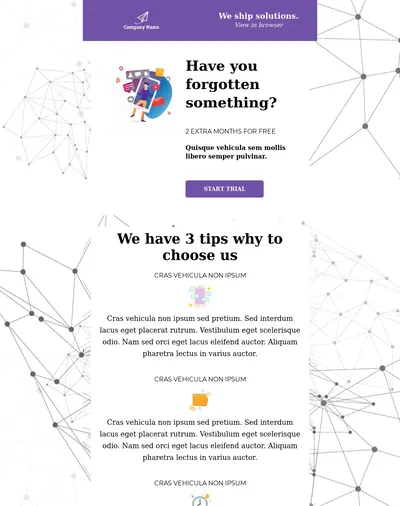
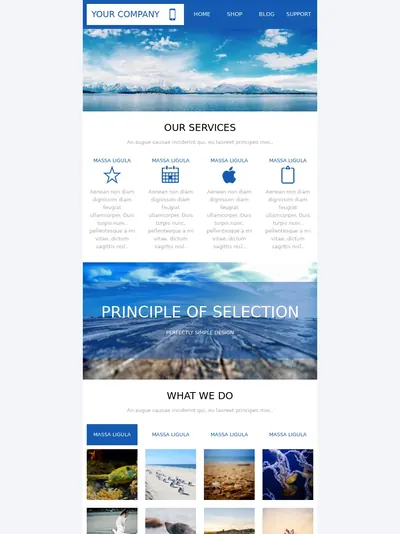

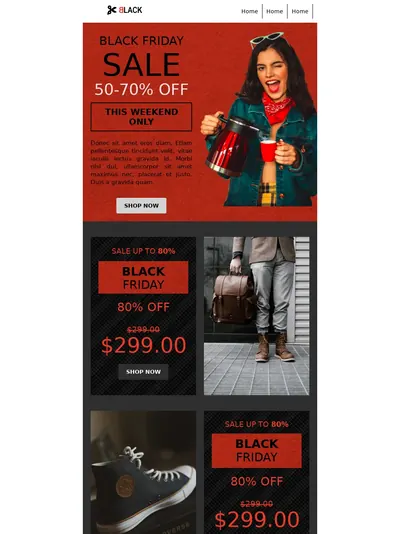



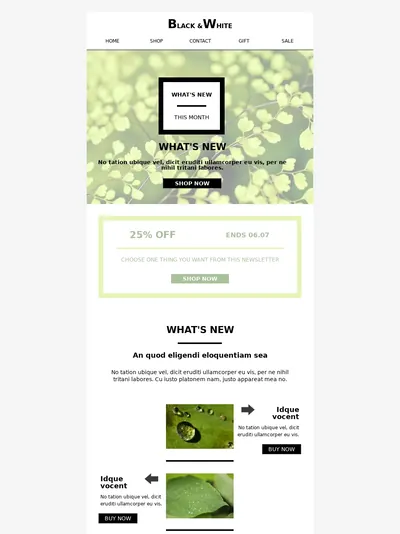
Template 1 of 10: Marketing Agency Newsletter
Integrations
SendGrid
SendGrid maintains official SDKs for Node.js, Python, PHP, Java, C#, Go, and Ruby, with SMTP relay as the language-agnostic fallback. The integration marketplace lists 100+ partner integrations covering CMS (WordPress, Drupal), e-commerce (Shopify, WooCommerce, Magento), CRM (Salesforce, HubSpot), analytics (Segment, Mixpanel), and developer tools (Zapier, Make). The Event Webhook pushes delivery events in real time: processed, delivered, deferred, bounce, dropped, open, click, spam report, unsubscribe, group unsubscribe, group resubscribe (note: a "blocked" outcome is classified as a soft-bounce subtype within the bounce event, not a separate webhook event), plus an optional account status change event for compliance actions taken on the account. Email API and Marketing Campaigns share a single account and dashboard, so authentication, identity, and billing live in one place even though the products bill separately. As part of Twilio, accounts can also be wired to Twilio's SMS, voice, and verification APIs without additional vendor onboarding.
Strengths: seven first-party SDKs, mature SMTP relay, large integration marketplace, full event webhook set, shared dashboard with Twilio's SMS/voice/verification products, subuser management for agency/multi-tenant setups (Pro and above).
Trade-offs: Email API and Marketing Campaigns are billed separately even when sharing an account, so any "full functionality" integration spans two product subscriptions. Some marketplace apps charge separately. Documentation is comprehensive but spread across SendGrid, Twilio, and legacy domains, which can make discovery harder than the volume suggests.
BlueFox Email
BlueFox Email exposes an API for contacts, subscriptions, transactional sends, and triggered sends. Webhooks push real-time events: sent, failed, opens, clicks, bounces, complaints, subscribe, unsubscribe, pause, resubscribe. Direct integrations: Supabase for auth emails (signup confirmation, magic links, password reset, email address changes, reauthentication, and invitations) and Zapier with six triggers (New Contact, Contact Updated, Contact Deleted, New Subscription, Unsubscribed, Subscription Paused) and eight actions. There's also a local MCP server that lets AI agents such as Claude, Cursor, or Windsurf manage a project through 60+ tools. In BYO SES mode, you keep direct AWS access for any SES-level integration. BlueFox documents SNS specifically for bounce and complaint webhooks, and since it's your own AWS account, anything else you wire up is between you and AWS rather than something BlueFox builds or documents.
Strengths: complete API on every plan, full webhook event set on every plan, Supabase-native auth email path, Zapier connectivity, MCP server for AI agents, BYO SES mode gives direct AWS integration without abstraction.
Trade-offs: small native marketplace (Supabase, Zapier, and the MCP server are the main first-party integrations), no language-specific SDKs (REST API only), no native e-commerce platform sync, no native CRM connector.

Automation
SendGrid
SendGrid's automation lives inside Marketing Campaigns under the Automations feature. Two automation types are available: Welcome (pre-built series for new contacts) and Custom (build your own series with up to several emails). Triggers are list-based: contacts enter when added to a designated list or matching a segment. Each step is a templated email separated by a configurable time interval. A/B testing within automations is supported on the Advanced tier and above.
Editing live automations comes with documented constraints. SendGrid's official help states: "Once an Automation has been set live the first time it can no longer be edited. Any changes should be made before first setting the Automation live. Even if later paused, the Automation cannot be changed once it has been live at all." Workarounds exist: you can disable the automation (which stops sends), make certain edits, and re-enable it; or duplicate the entire automation and route new contacts to the new version. Disabling-and-editing covers some changes (template content via Save and Apply), but structural changes like entry/exit criteria and interval timing typically require the duplicate path, and duplicated automations don't carry over existing contacts.
Automation is not included in the Marketing Campaigns Basic plan ($15/mo); it requires Advanced ($60/mo) or higher. The 60-day free trial includes one Automation series.
Strengths: unified contact list with the Email API product, A/B testing inside flows (Advanced+), pre-built Welcome series template, list and segment triggers.
Trade-offs: structural automation edits require duplicate-and-rebuild rather than in-place editing. Automation requires Advanced Marketing Campaigns ($60/mo minimum); not available on Basic. Free trial limit is one automation. No native e-commerce triggers (no abandoned cart, no purchase events) outside of API-driven custom contact updates.
BlueFox Email
BlueFox Email's automation builder is available on every plan including the free tier. Trigger types: Contact Added, Contact Updated (with from/to property conditions), Enter Segment, Leave Segment, and Time Based (recurring schedules against a whole list). Node types: Send Email, Notify (send to a list or specific addresses rather than the flowing contact), Timer, Audience Filter (property, segment, or email activity), Branching with Condition nodes (multi-path), Set Value (update a contact property mid-flow), Manage Tags (add/remove tags), Webhook (fire an HTTP request to an external URL mid-flow), and Complete (defined exit). Exit Criteria lets contacts leave the flow early based on property, segment, or email activity. Running flows can be edited and the updates applied to upcoming-only or upcoming-and-in-progress contacts.
Strengths: all automation features on every plan, segment-based and schedule-based triggers, mid-flow contact property updates, email-activity-based branching, an in-flow webhook node, live editing of running flows without duplicate-and-rebuild.
Trade-offs: no A/B testing inside automation flows, no SMS action, no native e-commerce triggers (no abandoned cart, no purchase events). Those have to be wired via the API, the Webhook node, or Zapier. Fewer pre-built journey templates than SendGrid's Welcome series.
Deliverability and Infrastructure
SendGrid
SendGrid's deliverability infrastructure is one of its strongest selling points. The platform has direct peering relationships with Google, Yahoo, Apple, and Microsoft (the four largest email providers), which it cites as a deliverability advantage at scale. Authentication covers SPF, DKIM, and DMARC for custom sending domains. Dedicated IPs are included with Pro Email API plans and Advanced Marketing Campaigns plans (one IP each); additional dedicated IPs are a paid monthly add-on (third-party reviews put them at $30/month each; Twilio doesn't list the price on its pricing page). You can add one new IP per month yourself in the console, and more through support. SendGrid recommends at least 2 dedicated IPs once volume reaches 200K to 300K/month. Trial and Essentials accounts use shared IP pools grouped by sender reputation; shared IPs are not visible from inside the account and can change without notice.
Note that SendGrid does not monitor the reputation of dedicated IPs; that responsibility shifts to the sender. Searchable email activity history is limited on lower tiers (3 days on the trial and Essentials, 7 days on Pro), with extended history available as a paid add-on. Overage fees apply when plan limits are exceeded.
Strengths: direct peering with major mailbox providers, automatic IP warmup on dedicated IPs, SPF/DKIM/DMARC support, subuser accounts for traffic segmentation (Pro+), enterprise scale, well-documented bounce and suppression handling.
Trade-offs: dedicated IPs require Pro or Advanced Marketing Campaigns ($89.95/mo or $60/mo respectively); Essentials doesn't include one. Additional IPs cost extra each month, and only one can be added per month without contacting support. Activity history retention is short on lower tiers. Account suspensions during sender-reputation reviews are a recurring complaint in third-party reviews, particularly for new accounts ramping volume quickly; billing continues during suspension reviews. Shared-IP senders cannot see which IP they're sending from.
BlueFox Email
BlueFox Email has three delivery modes documented in Delivery Modes:
- Sandbox (default for new projects, BlueFox-managed infrastructure): send to any recipient with no verified-recipient requirement, capped at 100 emails/day and 1 email/second. No AWS account required. Sends from
no-reply@bluefoxemailsandbox.comby default, though a verified custom domain can be used here too. - Production (BlueFox-managed infrastructure, after a review): your approved monthly sending volume, usually set to match what you request on the production application (accounts still building a track record can start lower), with limit increases available on request plus custom sender identities and your own verified domain.
- BYO AWS SES (optional): connect your AWS account via direct credentials or STS Role ARN. Required permissions:
ses:SendEmail,ses:SendRawEmail,ses:ListIdentities,ses:GetSendQuota. You keep your own AWS sending reputation and IP isolation, and can use an AWS SES dedicated IP if configured there.
To stay in production, projects must maintain bounce rate below 2.5% and complaint rate below 0.05%, shown live in the project dashboard. Bounced and complained addresses are added to a per-project suppression list automatically, and teams can also manually add or CSV-import other problematic addresses to prevent re-sending. An optional dedicated IP add-on is also available for managed sending at $50/month (excl. VAT), requested by email. On BYO AWS SES, a dedicated IP is set up and billed directly through the customer's own AWS account instead. The platform also supports a subscription preferences page and a pause-instead-of-unsubscribe link.
Strengths: managed-mode + BYO-SES choice on the same product, your-domain sending, dedicated IP add-on at a published price ($50/month, excl. VAT) with no plan-tier requirement, transparent bounce/complaint thresholds visible in-product, automatic per-project suppression list, STS-based AWS auth (no long-lived keys), preferences page and pause-instead-of-unsubscribe built in.
Trade-offs: No direct ISP peering relationships at the platform layer; in managed mode, deliverability rides on AWS SES's reputation rather than dedicated-to-sender peering. Smaller community than SendGrid, so less third-party deliverability tooling and shared best-practice content.
Personalization
SendGrid
SendGrid uses Handlebars syntax for Dynamic Templates, supporting variable substitution ({{firstName}}), conditionals ({{#if}}…{{else}}…{{/if}}), iteration over arrays, and substring helpers. Personalization data is passed at send time via the API's dynamic_template_data field for transactional sends, or via Contact custom fields for Marketing Campaigns. Marketing Campaigns supports custom contact fields plus reserved fields like first name, last name, alternate email, address, and city.
Strengths: Handlebars syntax familiar to developers, comprehensive helper library (greaterThan, length, formatDate, equals, etc.), dynamic data injection at send time via API, conditional content blocks at every plan level.
Trade-offs: visual personalization tools are limited compared to dedicated marketing platforms; most personalization is configured in the template editor or via API. No native e-commerce product merges (must be passed in as custom data). Advanced personalization scenarios typically require development work to assemble the payload.
BlueFox Email
BlueFox Email also uses Handlebars for personalization: {{contact.firstName}} for fields and {{#if}}…{{else}}…{{/if}} for conditional content, with added logical operators (AND, OR, NOT, EQ, INCLUDES), loop helpers ({{#each}} with skip/limit), and string helpers (CAPITALIZE, TRUNCATE). Built-in tags live under the contact object: {{contact.email}} is always available, and any custom contact property you define (for example {{contact.firstName}}) is addressed the same way. {{unsubscribeLink}} and {{pauseSubscriptionLink}} are also built in, but only for non-transactional sends. Contact properties beyond email are defined in Project Settings → Contact Properties and can be set or updated programmatically via the API or from inside an automation flow (Set Value node). Personalization is available on every plan including the free tier.
Strengths: standard Handlebars syntax (same family as SendGrid's, so familiar to anyone moving between the two), added logical operators, loop controls, and string helpers beyond default Handlebars, conditional blocks at every plan level, contact properties updatable via API or in-flow Set Value node, pauseSubscriptionLink enables a pause-instead-of-unsubscribe path, dynamic image rendering via data feeds.
Trade-offs: no pre-built e-commerce product merges (must be passed in via the API), no geographic or timezone tags out of the box, fewer Handlebars helpers than SendGrid's library.
Segmentation
SendGrid
SendGrid's segmentation lives inside Marketing Campaigns and supports filtering on contact fields, list membership, and engagement data (opens, clicks). Segments refresh automatically in the background, and it can take time for a segment to pick up recent contact changes. A segment can be refreshed manually no more than once per hour, and the refresh endpoint is rate-limited to 10 requests per day. Segments can stack criteria using AND/OR logic. Segmentation is part of Marketing Campaigns; Email API plans alone don't include segment tooling.
Strengths: stackable AND/OR criteria, engagement-based filters, segment-driven automation triggers, manual refresh option.
Trade-offs: segments are not real-time; changes take time to propagate, which can affect time-sensitive campaigns. Segmentation requires a Marketing Campaigns plan (not available with Email API only). Building complex stacked criteria can produce conflicting logic that's hard to debug. No predictive or AI-driven segmentation.
BlueFox Email
BlueFox Email's segments use AND/OR condition logic with ten operators: equals, does not equal, contains, does not contain, is empty, is not empty, greater than, less than, greater than or equal, less than or equal. Filters apply to any contact property or tag, plus engagement-based conditions (received, not received, opened, not opened, clicked, not clicked) over a configurable day window. Segments can be scoped to a single subscriber list or to all contacts in the project, and can drive both campaign delivery and automation triggers (Enter Segment / Leave Segment).
Strengths: no plan-based limit on conditions (every feature is on every plan), engagement-based segments at every plan level, segments usable as automation triggers, segment-scoping to list or whole project, no separate "marketing" subscription required for segmentation.
Trade-offs: no pre-built segment templates versus SendGrid's broader options (the closest equivalent, excluding unengaged contacts from a send, is a separate project-wide setting rather than an actual segment), no predictive/AI segmentation, no built-in e-commerce filters (no "purchased product X" out of the box; those need contact properties set via API), no geolocation filtering out of the box.
0of 1,240 contacts matched
You chooseWho should hear this?
- Active in last 30 days
- Plan: Pro
- Project created

We deliver toOnly the right people


Stop blasting everyone. Filter by behavior, plan, activity, or any property you've collected. Higher engagement, less waste, more revenue per send.
Analytics and Reporting
SendGrid
SendGrid tracks delivery, opens, unique opens, clicks, unique clicks, bounces, blocks, spam reports, and unsubscribes across both Email API and Marketing Campaigns. The Activity feed shows individual message events; the Stats dashboard rolls them up by day, by mailbox provider, by category, by IP, by template, by browser, by device, and by location. The Event Webhook pushes events in real time for external dashboards. Marketing Campaigns reports also include A/B test results and per-automation step performance. Searchable email activity covers 3 days on the trial and Essentials and 7 days on Pro; longer history requires the paid Additional Email Activity History add-on.
Strengths: wide cut dimensions (mailbox provider, IP, category, device, geo), per-step automation analytics, real-time event webhook, A/B test reporting.
Trade-offs: short activity retention on lower tiers (3 to 7 days); long-window analysis requires the add-on or external storage. No revenue or ROI tracking on connected stores (you'd need to wire this through Twilio Segment or external analytics). Stats and Activity live in different dashboards, which adds friction. No live sender-reputation or inbox-placement scoring.
BlueFox Email
BlueFox Email's Statistics page scopes analytics at account, project, campaign, transactional email, triggered email, automation, and subscriber list levels, split into two tabs. Email Sending Trends covers sends, send rate, failures, failure rate, opens, unique opens, clicks, unique clicks, bounces, complaints, and several derived rates. Subscription Trends covers new contacts, subscriptions, unsubscribes, pauses, unpauses, and resubscriptions. Charts switch between hourly, daily, weekly, and monthly intervals (daily/weekly/monthly support up to a 1-year range, hourly up to 7 days). Every email or automation's detail page includes a raw, filterable data table down to the individual contact and per-link click level, exportable as CSV, plus a Clean Contacts option to prune bounced or complained addresses. Project-level dashboard shows live bounce rate (against the 2.5% ceiling) and complaint rate (against the 0.05% ceiling). Automation cards expose Runs, Active, Sends, Opens, Clicks for the whole flow plus per-node breakdowns. Webhooks push every event in real time for external dashboards.
Strengths: live bounce/complaint ratios against the production thresholds, per-email-type and per-automation-node stats with contact-level CSV export, real-time webhook push for external analytics, full event set on every plan, no retention add-on required.
Trade-offs: no revenue or ROI tracking, no breakdowns by mailbox provider or device, link-click table shows per-URL click counts but no visual heatmap overlay, no built-in A/B testing reports.
Analytics
Analytics that show what happened
Delivery, opens, clicks, bounces, and subscription trends. Switch between hourly, daily, weekly, and monthly views.
Sent6,200
Failed0
Opens4,805
Unique Opens3,210
Clicks748
Unique Clicks182
Bounced8
Complaints0
Support and Learning Resources
SendGrid
Support channels depend on the plan. The free trial gets ticket support. On Marketing Campaigns, Basic adds chat and phone support, and Advanced adds guaranteed response times on ticket, chat, and phone. On the Email API side, Twilio's pricing page lists personalized support as a paid add-on on Essentials, Pro, and Premier, and Premier can also add expert email program management. Self-service resources include extensive technical documentation, API references, code libraries across seven languages, a knowledge base, and developer guides. Twilio's broader community forum and documentation hub also apply.
Strengths: chat and phone support on paid Marketing Campaigns plans, guaranteed response times on Advanced, purchasable personalized support and expert services, mature multi-language documentation, large public knowledge base, integration with Twilio's developer community.
Trade-offs: Free trial accounts get ticket support only. Fuller support on the Email API is a paid add-on rather than included. Documentation spans SendGrid's legacy docs, Twilio's current docs, and the support knowledge base, which can complicate searches. Support response quality is a recurring complaint in third-party reviews, particularly around account-status disputes during sender-reputation reviews.
BlueFox Email
BlueFox Email provides email support across all plan tiers. Users can also book a direct call with the founder from inside the product for hands-on help, onboarding, technical setup, or use-case fit. Self-service resources include the product documentation, a glossary, comparison articles, and a smaller set of blog posts and guides. There is no formal learning platform, no certified-partner program, and no agency directory.
Strengths: same support tier for free and paid users, in-product founder call booking for direct help, direct line to the people who build the product.
Trade-offs: small team; this level of direct access is a function of company stage, not a permanent commitment. No 24/7 desk, no phone hotline, no live-chat. No formal training platform. No multi-language SDKs to document. Knowledge base, community forums, and third-party tutorial coverage are all smaller than SendGrid's.
Pricing
The two platforms price on different axes, which makes head-to-head comparison sensitive to the scenario.
Dated, sourced entries on SendGrid's pricing are in the SendGrid pricing history.
SendGrid (dual-product, volume + contact-based)
SendGrid's pricing has two independent tracks. Teams that need both transactional sending and marketing campaigns subscribe to both, and emails sent through Marketing Campaigns are counted separately from Email API sends.
Email API (billed by monthly send volume):
| Plan | Price | Volume | Notes |
|---|---|---|---|
| Free Trial | $0 | 100 emails/day | 60 days only |
| Essentials 50K | $19.95/mo | 50,000 | No dedicated IP, 1 teammate |
| Essentials 100K | $34.95/mo | 100,000 | No dedicated IP |
| Pro 100K | $89.95/mo | 100,000 | 1 dedicated IP included |
| Pro 300K | $249/mo | 300,000 | 1 dedicated IP included |
| Pro 700K | $499/mo | 700,000 | 1 dedicated IP included |
| Pro 1.5M | $799/mo | 1,500,000 | 1 dedicated IP included |
| Pro 2.5M | $1,099/mo | 2,500,000 | 1 dedicated IP included |
| Premier | Custom | 5M+ | Custom volume, more email validations, expert program management available |
Marketing Campaigns (billed by contacts stored and emails sent):
| Plan | Price | Contacts | Emails/month | Notes |
|---|---|---|---|---|
| Basic 5K | $15/mo | 5,000 | 15,000 | No automation, no dedicated IP |
| Advanced 10K | $60/mo | 10,000 | 50,000 | Automation, A/B testing, dedicated IP |
| Advanced 20K | $100/mo | 20,000 | 100,000 | Automation, A/B testing, dedicated IP |
| Advanced 50K | $250/mo | 50,000 | 250,000 | Automation, A/B testing, dedicated IP |
| Advanced 100K | $450/mo | 100,000 | 500,000 | Automation, A/B testing, dedicated IP |
| Advanced 200K | $900/mo | 200,000 | 1,000,000 | Automation, A/B testing, dedicated IP |
| Custom | Custom | Above 200,000 | Custom | Enterprise tier |
Add-ons: additional dedicated IPs on Pro and Advanced (third-party reviews report $30/month each; not listed on Twilio's pricing page); Email Validation beyond the 2,500 (Pro) or 5,000 (Premier) included validations, reported from $9.95/month for 5,000; extended email activity history as a paid add-on. Overage fees apply when plan limits are exceeded; on Marketing Campaigns they range from $0.0023 to $0.0075 per extra email or contact, depending on the plan.
BlueFox Email (per-send)
BlueFox Email charges per send, never per contact. One send is one email delivered to one recipient, and transactional, triggered, and campaign emails all cost the same. Contacts are unlimited, every plan and pack includes every feature, and sends are bought at the workspace level and shared across all projects. All prices below exclude VAT, which is applied at checkout based on your local rate.
There are two ways to pay (a recurring monthly plan or one-time send packs) and two ways to send: Standard, where BlueFox Email manages the sending infrastructure, or BYO AWS SES, which gives 2× the sends at the same price while you pay AWS directly for sending. New workspaces get a one-time allowance of 3,000 free sends on Standard pricing or 6,000 on BYO SES pricing, valid for 12 months, with no credit card required.
Monthly plans (excl. VAT)
Best for regular, steady sending.
| Plan | Price / month | Standard sends / month | BYO AWS SES sends / month |
|---|---|---|---|
| Starter | $6 | 5,000 | 10,000 |
| Basic | $9 | 10,000 | 20,000 |
| Growth | $19 | 25,000 | 50,000 |
| Pro | $35 | 50,000 | 100,000 |
| Business | $59 | 100,000 | 200,000 |
| Scale | $129 | 250,000 | 500,000 |
| Elite | $239 | 500,000 | 1,000,000 |
Each billing cycle brings a fresh sending allowance, and unused sends do not roll over. You can cancel anytime and keep using your allowance until the current billing period ends, or upgrade anytime by paying the price difference, with the new plan starting right away. On Standard, the effective rate runs from $1.20 per 1,000 sends on Starter down to about $0.48 per 1,000 on Elite; BYO SES halves that, before AWS fees.
One-time send packs (excl. VAT)
Best for occasional or unpredictable volume, or for teams that prefer to pay upfront.
| Pack | Price | Standard | BYO AWS SES |
|---|---|---|---|
| Essential | $50 | 50,000 sends ($1.00 per 1,000) | 100,000 sends ($0.50 per 1,000) + AWS fees |
| Premium | $300 | 500,000 sends ($0.60 per 1,000) | 1,000,000 sends ($0.30 per 1,000) + AWS fees |
Pack sends are valid for 12 months from the date of purchase, and you're never billed again unless you buy another pack. Packs stack with no cap, and the oldest sends are always used first, so the newest last the longest.
AWS fees (BYO SES only)
In BYO mode, AWS bills you directly for sending, separately from your BlueFox Email plan or pack. At AWS's à la carte rate of $0.10 per 1,000 emails, 100,000 sends add about $10, and every BYO figure in this comparison uses that rate.
If your AWS account is new, check which SES pricing option it's on. Since July 21, 2026, new SES accounts (and account/region combinations with no metered SES activity since June 1, 2025) start on the SES Essentials plan at $0.16 per 1,000 emails for the first 10M per month. You can switch to à la carte pricing at any time.
Dedicated IP
Teams on managed sending can add a dedicated sending IP for $50/month (excl. VAT). The IP is reserved for your workspace, so your sender reputation depends only on your own sending. To set one up, email hello@bluefox.email. On BYO AWS SES there's nothing to buy from BlueFox Email: dedicated IPs are set up and billed in your own AWS account.
Custom volume
If you need more than the published plans and packs cover, contact sales at hello@bluefox.email. The team sets up a discovery call to plan your volume and onboarding.
How to read the scenarios
Each scenario below states its own contact count and send volume instead of assuming a typical sending frequency, because how often you email each contact varies a lot from sender to sender. Keep in mind how each product counts: SendGrid's Email API is billed by email volume only, while Marketing Campaigns is billed by contacts stored and emails sent, with contacts counted cumulatively across the calendar month. BlueFox Email bills only for sends, never for contacts. The more often you email each contact, the more sends you need on any of them, so plug in your own contact count and frequency to see how the two compare for you.
Scenarios: monthly plans
Monthly plans suit regular, steady sending, so these scenarios compare SendGrid's monthly price with the BlueFox Email plan that fits each month's volume. All BlueFox Email prices exclude VAT, and BYO SES figures include AWS fees at $0.10 per 1,000 emails.
Light ongoing sending (about 1,000 emails/month):
- SendGrid: the free trial covers the first 60 days; after that, Essentials 50K at $19.95/month.
- BlueFox Email Standard: the 3,000 free sends cover the first 3 months, then Starter at $6/month (5,000 sends).
- BYO SES: the 6,000 free sends cover the first 6 months, then Starter at $6/month plus about $0.10/month in AWS fees.
Transactional-only SaaS at small volume (5,000 users × 8 transactional emails each = 40,000 sends/month, no marketing needed):
- SendGrid Essentials 50K: $19.95/month.
- BlueFox Email Standard: Pro at $35/month (50,000 sends).
- BYO SES: Growth at $19/month (50,000 sends) plus ~$4 AWS = ~$23/month.
For pure transactional sending in this band, SendGrid Essentials is cheaper than BlueFox Email Standard. BYO SES gets within a few dollars but doesn't beat SendGrid's headline number.
SaaS with transactional + light marketing (40,000 transactional sends plus about 10,000 automation emails to 5,000 contacts = 50,000 sends/month):
- SendGrid: Email API Essentials 50K ($19.95) for the transactional traffic + Marketing Campaigns Advanced 10K ($60, includes 50,000 marketing emails) for the automations = $79.95/month. Basic at $15 doesn't include automation.
- BlueFox Email Standard: Pro at $35/month covers all 50,000 sends, with everything included.
- BYO SES: Growth at $19/month (50,000 sends) plus ~$5 AWS = ~$24/month.
Once automation enters the picture, SendGrid's two-subscription requirement changes the math significantly.
Mid-size newsletter sender (10,000 contacts × 4 sends/week = about 160,000 sends/month, with segmentation and automation):
- SendGrid: Marketing Campaigns Advanced 10K includes only 50,000 emails/month, so this volume needs a higher email tier. The smallest listed Advanced plan that covers it is Advanced 50K at $250/month (250,000 emails). Without automation, Basic tiers are cheaper, but they don't include it.
- BlueFox Email Standard: Scale at $129/month (250,000 sends).
- BYO SES: Business at $59/month (200,000 sends) plus ~$16 AWS = ~$75/month.
Large transactional volume (1,000,000 sends/month, no marketing tooling needed):
- SendGrid Pro 1.5M: $799/month.
- BlueFox Email Standard: the largest monthly plan, Elite ($239), covers 500,000 sends; at 1,000,000 a month, contact sales for custom volume.
- BYO SES: Elite at $239/month (1,000,000 sends) plus ~$100 AWS = ~$339/month.
Scenarios: one-time packs
Packs suit occasional or unpredictable sending. Pack sends stay valid for 12 months, so each scenario below looks at a full year. SendGrid's plans are monthly subscriptions, billed whether you send that month or not. All BlueFox Email prices exclude VAT, and BYO SES figures include AWS fees at $0.10 per 1,000 emails.
Occasional campaigns (5,000 contacts × 4 sends a year, such as a quarterly newsletter or event announcements = 20,000 sends/year):
- SendGrid Marketing Campaigns Basic 5K: $15/month, billed every month, so $180/year.
- SendGrid Email API Essentials 50K (sending without the campaign tools): $19.95/month, or $239.40/year.
- BlueFox Email Standard: one Essential pack ($50) covers the whole year, with 30,000 sends to spare.
- BYO SES: one Essential pack ($50, 100,000 sends) plus ~$2 AWS = ~$52/year.
A big list, every few months (200,000 contacts × 1 send every 3 months, such as a quarterly announcement or a seasonal sale = 800,000 sends/year):
- SendGrid Marketing Campaigns: storing 200,000 contacts needs Advanced 200K at $900/month, billed every month, even the eight months with no send. That's $10,800/year.
- SendGrid Email API (sending without the campaign tools): each send month needs 200,000 emails, so Pro 300K at $249/month. Kept all year, that's $2,988/year.
- BlueFox Email Standard: two Premium packs ($600) cover the year, with 200,000 sends to spare.
- BYO SES: one Premium pack ($300, 1,000,000 sends) plus ~$80 AWS = ~$380/year.
Cost summary: For pure transactional sending at small volume on managed sending, SendGrid Essentials is cheaper than BlueFox Email, and BYO SES only gets close. The picture flips when (a) marketing automation is required, because SendGrid's second subscription costs more than BlueFox Email's whole bill, (b) volume grows: at 160,000 sends with automation, BlueFox Email costs roughly 50% to 70% less, and at 1,000,000 transactional sends BYO SES costs about 58% less than SendGrid Pro, or (c) you send occasionally: SendGrid keeps billing monthly, while one pack can cover a whole year, which comes in roughly 70% to over 95% below SendGrid in the pack scenarios above.
Where SendGrid makes sense despite the higher price at scale:
- Pure transactional sending at small volume on managed infrastructure, where Essentials ($19.95 for 50,000 emails) undercuts BlueFox Email's Pro plan ($35).
- Direct ISP peering relationships are a deliverability advantage for senders concerned about inbox placement at major mailbox providers.
- You also need SMS or voice via the broader Twilio platform, and prefer a single vendor.
- You want first-party SDKs across multiple languages rather than rolling against a REST API.
- You need SendGrid's subuser model specifically (separate API keys and IP pools per subuser).
- You want a dedicated IP included in your plan price (SendGrid bundles one into Pro/Advanced tiers) rather than as a separate monthly add-on.
Where BlueFox Email is the clear choice:
- Mid-to-high-volume sending where per-send pricing beats the dual-product subscription stack.
- Occasional or seasonal sends to a large list: one pack can cover a whole year, with nothing billed in the months you don't send.
- You want automation, segmentation, and analytics on the free tier without upgrading.
- You want to bring your own AWS SES and keep your own sending reputation.
- You need to edit live automations in place rather than disable/duplicate.
- You want a single product covering transactional, triggered, and marketing emails with one bill.
- You need per-project suppression-list visibility and bounce/complaint thresholds shown in-product.
- You run an agency or multi-client setup: isolated client workspaces (one account, many projects) with Admin, User, and Client roles, where a Client's access can be scoped to Editor or Viewer per project.
Notes on both:
- SendGrid pricing shifts with volume and contact count and adds overage fees. Always check current published rates.
- BlueFox Email prices are public, with flat monthly plans and one-time packs, all excluding VAT. In BYO mode, AWS bills sending separately; the figures here use AWS's $0.10 per 1,000 à la carte rate.
- The October 2026 numbers above are the current published figures for both vendors; always check their live pricing pages, as plans and add-ons change.
Which Fits Your Use Case
Pick by what you actually need.
| If you need… | Likely better fit |
|---|---|
| Direct peering with Google, Yahoo, Apple, Microsoft for deliverability | SendGrid |
| First-party SDKs in Node, Python, PHP, Java, C#, Go, Ruby | SendGrid |
| Email + SMS + voice under one vendor (via Twilio) | SendGrid |
| SendGrid's subuser model (separate API keys and IP pools per subuser) | SendGrid (Pro+) |
| Agency setup: client workspaces (account + projects) with per-project client roles | BlueFox Email |
| Activity feed and stats split by mailbox provider, device, and geo | SendGrid |
| Chat and phone support (paid Marketing Campaigns plans) | SendGrid |
| Pure transactional sending at small volume (<50K/mo, no marketing tooling) | SendGrid Essentials |
| Mid-to-high-volume sending with predictable per-send costs | BlueFox Email |
| Occasional sends to a large list without a monthly bill | BlueFox Email |
| Automation, segmentation, A/B-able templates on the free tier | BlueFox Email |
| Bring-your-own AWS SES with STS Role ARN | BlueFox Email |
| Live editing of running automations without disable/duplicate | BlueFox Email |
| Single product covering transactional, triggered, and marketing | BlueFox Email |
| Suppression-list visibility and bounce/complaint thresholds in-product | BlueFox Email |
| Subscription preferences page and pause-instead-of-unsubscribe | BlueFox Email |
| All features available on the free tier | BlueFox Email |
Both platforms can deliver email well at scale. The decision usually comes down to whether you want SendGrid's enterprise-scale infrastructure with deep developer tooling and a dual-product structure, or BlueFox Email's focused single-product platform with per-send pricing and a managed-or-BYO SES delivery choice.
If you're weighing other providers too, see how BlueFox Email compares to MailerSend, Resend, and Brevo.
Scale Your Agency with Professional Email Solutions
Deliver pixel-perfect, on-brand emails for every client. Maintain consistency across campaigns and elevate your agency's reputation with reliable email infrastructure.