
Appearance
BlueFox Email Is an Amazon SES Wrapper
Every email we send goes through Amazon SES. This article is about the part that happens before it gets there.
TL;DR
| Amazon SES gives you | You build the rest |
|---|---|
| A sending API and an SMTP interface | Queueing, rate limiting, scheduling |
| DKIM signing and IP reputation | Retry handling for every message you hand off |
| An account-level suppression list | Contact lists, subscription preferences, signup forms |
| Bounce and complaint events | A consumer, a store, and a suppression check before every send |
| An event stream | Anything a person can actually read |
| No way to filter a list | Segments, and a way to build one without SQL |
| Templates with replacement values | A way for a non-developer to change one |
Amazon SES is a very good sending layer. It was never meant to be everything else.
Yes, BlueFox Email is an Amazon SES wrapper
We are not going to argue with the label.
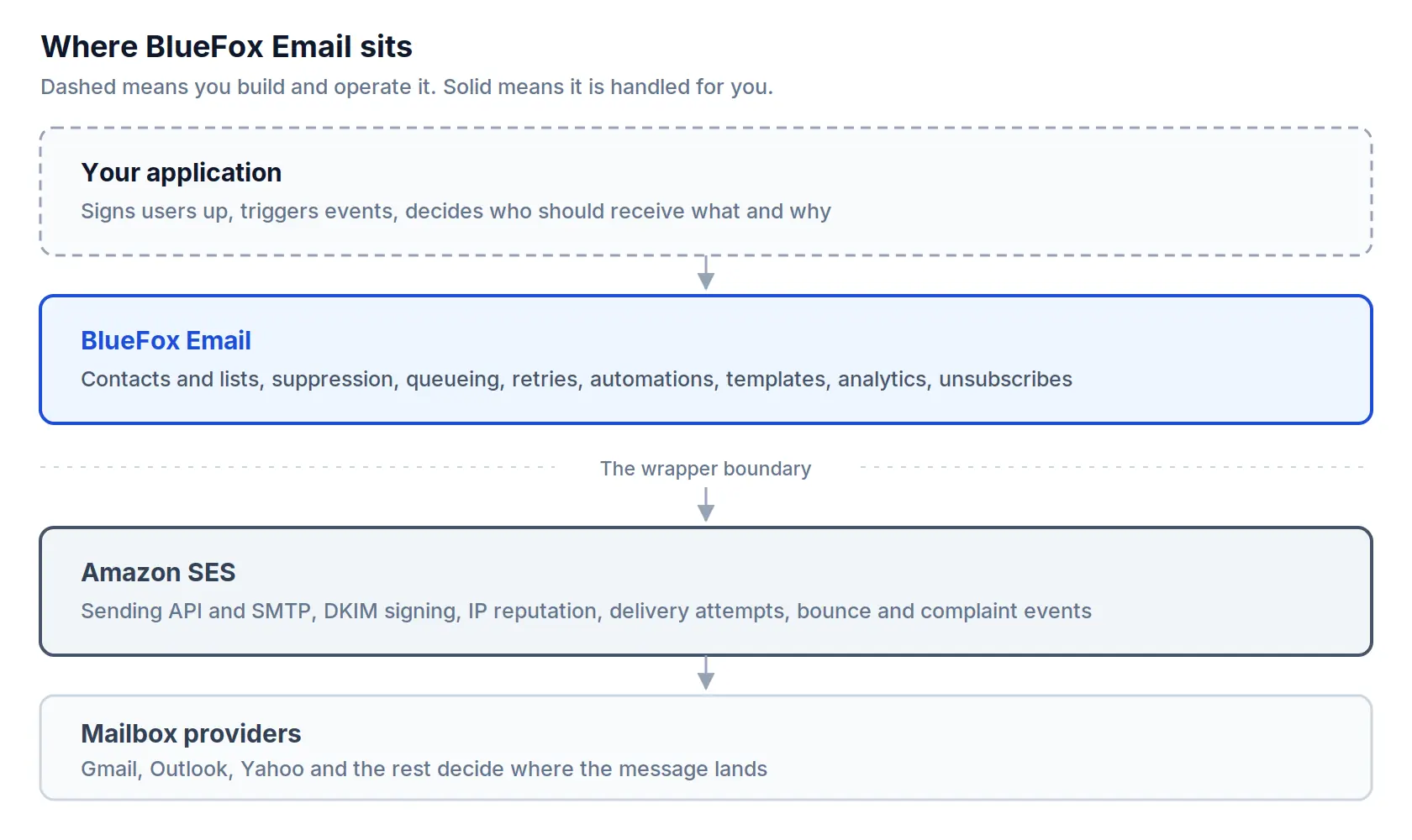
BlueFox Email does not deliver mail itself. We do not run mail transfer agents, and we do not own the IP addresses your email is sent from. Amazon SES does that part.
What varies is whose SES account it is. With BYO Amazon SES, it is yours. You own the account, the quotas and the reputation, and BlueFox is a layer on top of infrastructure you control. With BlueFox-managed sending, you never create an SES account, and we operate the sending environment instead. That is a real difference in who carries the reputation, and it is why managed projects are held to a bounce and complaint threshold.
Either way, the last hop is SES. If that is your definition of a wrapper, then yes, that is what we are.
The interesting question is not whether there is a layer. It is what that layer contains, and whether you would rather build it yourself.
This article answers that honestly. For some of you the answer will be that you should skip us and call SES directly, and we say so plainly near the end. For the rest, this is a fairly complete inventory of the work involved.
Why Amazon SES stops where it does
It helps to know why the gap exists, because it is not an oversight.
Amazon built AWS to serve Amazon. The company wanted to sell books everywhere, then everything everywhere, and that required infrastructure it could not buy. SES was one piece of it: a way to send order confirmations, shipping notices and password resets quickly and reliably, at a scale very few companies needed at the time.
Having built it, Amazon opened it to the public. The infrastructure already existed, and there was clearly a business in renting it out.
But notice what Amazon itself needed from email. Transactional messages, triggered by events in a system, in enormous volume. What Amazon did not need was a marketing team building a nurture sequence, or a designer changing the header of a receipt without filing a ticket. Amazon's own email problems were engineering problems, so SES was built as an engineering tool.
That is why SES looks the way it does. Not because Amazon failed to finish it, but because it was finished for a different job. Treating SES as an incomplete marketing platform misreads what it is. It is an excellent SMTP layer, and that is a legitimate business on its own.
What Amazon SES actually gives you
Before describing the gap, it is worth being accurate about what is already there, because a lot of writing on this subject understates it.
Out of the box, SES gives you:
- a sending API and an SMTP interface, in multiple AWS Regions
- DKIM key management and signing, plus the DNS records for SPF and DMARC
- shared IP pools, with dedicated and managed dedicated IPs available
- an account-level suppression list that records bounces and complaints
- configuration sets and event publishing to SNS, Amazon Data Firehose, EventBridge and CloudWatch
- email templates with replacement values, created and updated through the API
- contact lists, one per account, with topics for grouping
- Virtual Deliverability Manager, a paid add-on with deliverability dashboards and recommendations
That is a real feature set. If somebody tells you SES is just an SMTP relay, they have not read the documentation.
The gap is not in the sending. It is in everything between "I have a list of people" and "the right message reached each of them exactly once, at the right time."
Sending queues and rate limits
This is the hardest part, and the one that is most consistently underestimated.
What email needs. Your sending is bursty and the service you are sending through is not. A campaign to twenty thousand people arrives as one instruction and has to leave as twenty thousand individual messages, paced to something SES will accept, and it has to finish even if your server restarts halfway through.
What building it involves. SES enforces two limits per Region: a maximum sending rate in emails per second, and a daily sending quota over a rolling 24 hour window. Both count recipients rather than messages, so a message with 30 recipients spends 30 of your quota.
New accounts also start in the SES sandbox, capped at one email per second and 200 emails per 24 hours until you request production access.
Here is the part that matters. When you exceed either limit, SES does not hold the message for you. The AWS documentation is unambiguous: SES drops the message and does not attempt to redeliver it. Through the API you get a Throttling error with the message "Maximum sending rate exceeded", and through SMTP you get 454 Throttling failure after the DATA command.
A dropped message is not a delayed message. Nobody receives it, and unless you wrote something down before the call, you no longer know who was supposed to.
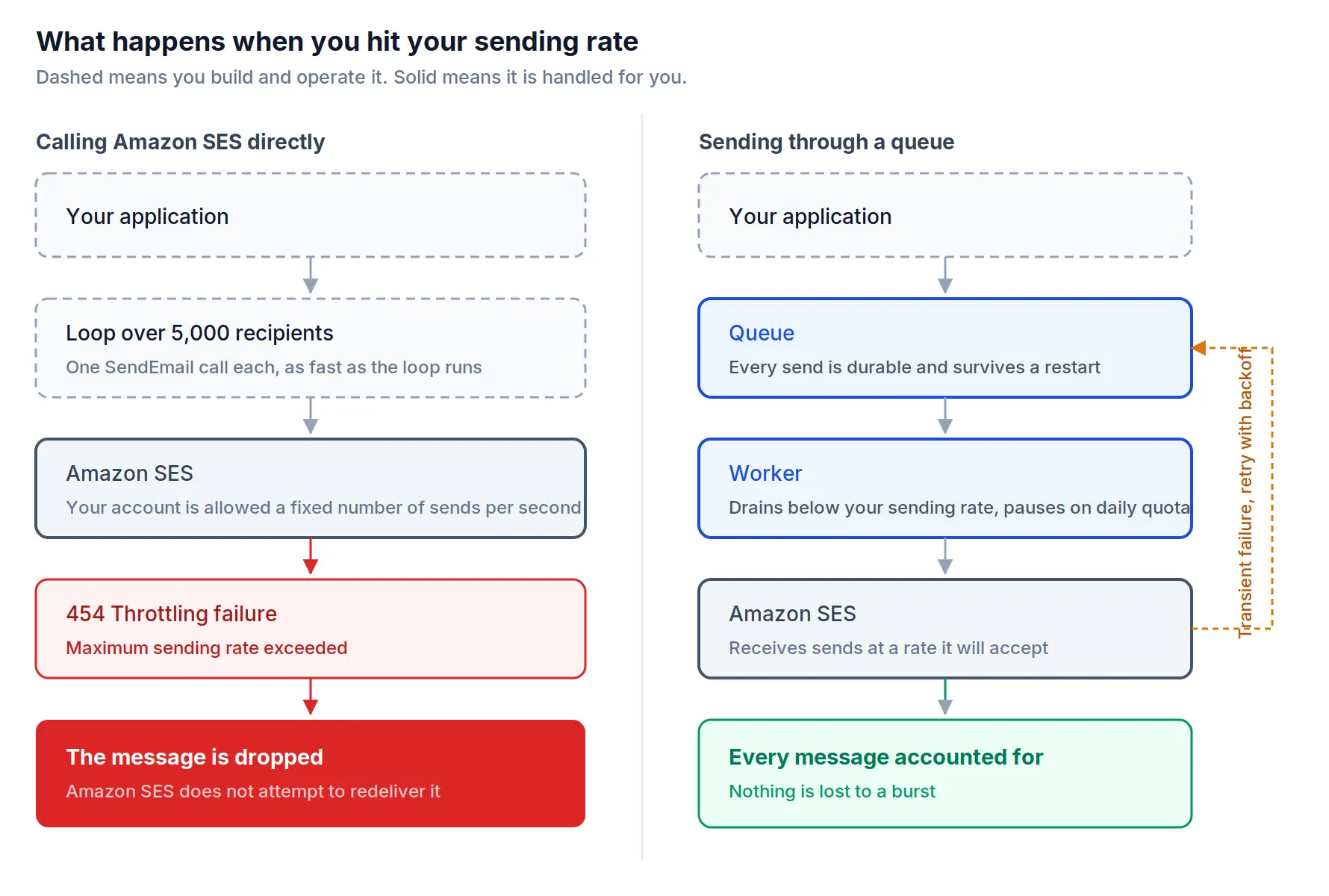
The usual first answer is that the AWS SDKs retry automatically. They do, and it is not enough. SDK retries are sized for an occasional collision, not for a loop that is running an order of magnitude faster than your allowed rate. A sustained burst exhausts the retry budget and then starts failing, which is exactly the situation a campaign creates.
So you need a real queue, and a real queue means:
- every intended send is written down durably before you call SES, not after
- a worker drains it at a rate below your sending limit
- rate errors back off with jitter, while daily quota exhaustion pauses instead of retrying, because retrying does not create capacity
- the whole thing resumes correctly after a deploy, a crash or a scale-down event
- you can see what is in the queue, and stop a send that should not have gone out
The last two are what separate a queue from a rate limiter, and they are usually the ones added after the first incident rather than before it.
What BlueFox does. Every transactional email, triggered email, campaign and automation email goes through our queue. Your application makes one call and is done. We pace the send and retry transient failures, so your application does not have to.
Retries, and the email that sends twice
What email needs. Every message should arrive exactly once. Not zero times, and very much not fifty times.
What building it involves. The failure is not exotic. You call SES, SES accepts the message and starts delivering it, and then the response is lost on its way back to you. Your call times out. From where your code is standing, a timeout and a rejection look identical, and there is no safe default: retry and you may duplicate, do not retry and you may drop.
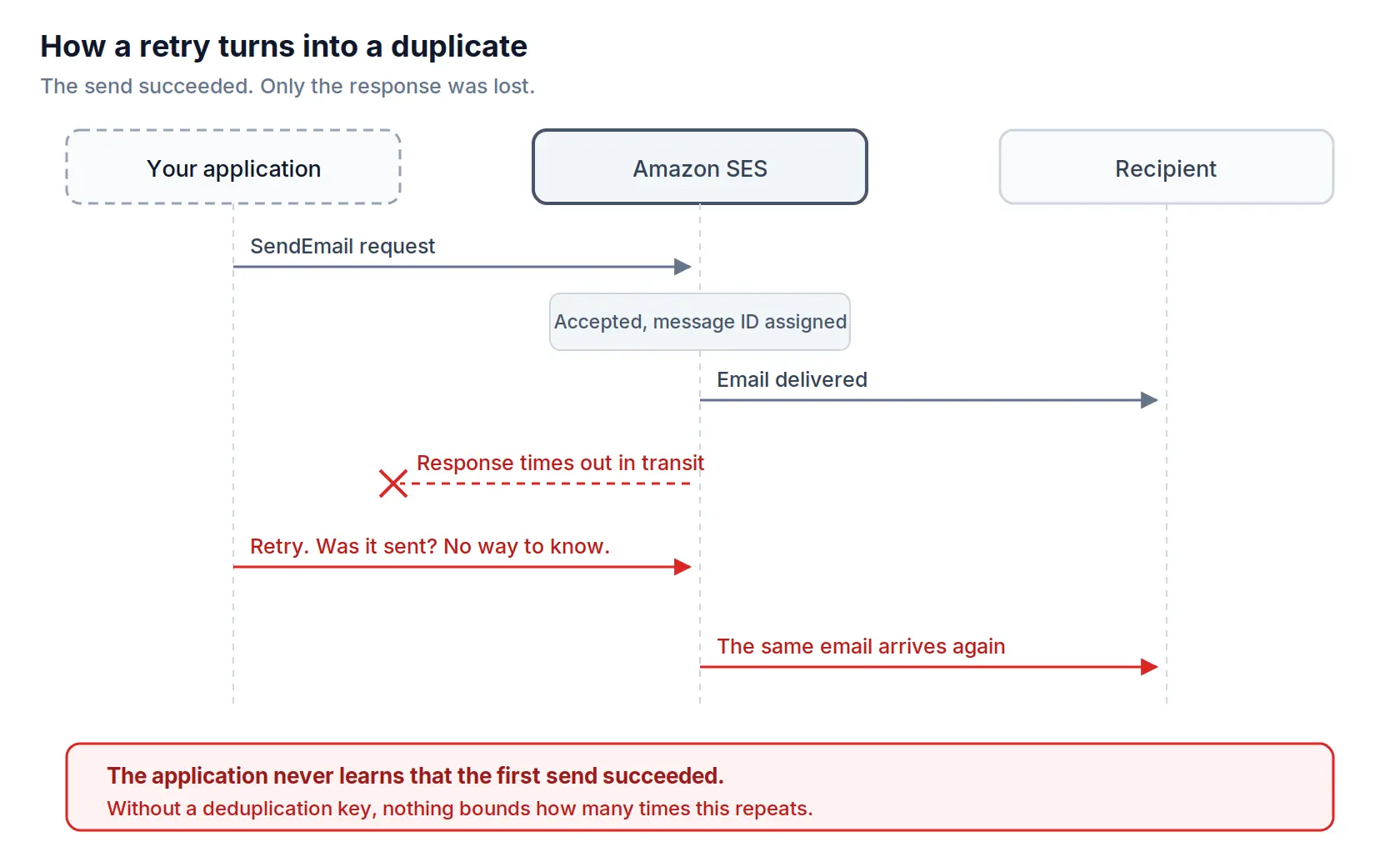
The reason this becomes fifty emails rather than two is that the retry usually lives inside a job runner that has its own retry policy, which lives inside a worker that gets restarted, which pulls from a queue that redelivers unacknowledged work. Each layer is individually reasonable. Together they multiply.
Fixing it means giving every intended send a stable identity before the first attempt, recording the outcome atomically with the send, and making the retry path check that record rather than assume. It is not conceptually difficult. It is just work that nobody scopes, because the naive version appears to function perfectly until the first time it does not.
What BlueFox does. Retry behaviour lives in one place, in the layer that owns sending, rather than being spread across your job runner, your worker and your queue. That does not make the problem disappear, but it means there is one layer to reason about instead of four. If this class of bug can catch a team that works on email full time, it can catch a team that works on email twice a year.
Contacts, lists, and subscriptions
What email needs. People join lists, leave them, join a different one, want the product updates but not the newsletter, and change their mind again in six months. That state has to be correct at the moment of every send.
What building it involves. SES does have list management, and it is genuinely useful for narrow cases, but the constraints are sharper than most people expect. Only one contact list is allowed per AWS account. A list can have at most 20 topics. There is no console interface for contacts, so everything happens through the API v2.
Then there is throughput. Every SES API action except the send operations is throttled at one request per second. ListContacts is one of those actions. Paginating a contact list of any size takes real time before a single message has been sent.
There is also a behaviour worth knowing about in advance:
Unsubscribes arrive as bounces
If you send to a contact who has unsubscribed on your SES contact list, SES issues a bounce event for that message. It stops the send, which is the correct outcome, but it means your unsubscribes and your genuine delivery failures land in the same metric unless you separate them yourself.
There is also the question of how contacts arrive in the first place. SES has nothing for collecting them: no form endpoint, no field validation, no bot protection, and no double opt-in flow. Double opt-in is more work than it sounds, because it means generating a token, sending a verification email, handling the click, expiring the ones nobody uses, and deciding what happens to a person who never confirms.
Most teams conclude fairly quickly that the contact list belongs in their own database. That is a defensible decision, and it is also the moment you have signed up to build subscription preferences, per-list opt-in state, a preferences page, double opt-in, form protection, and import and export.
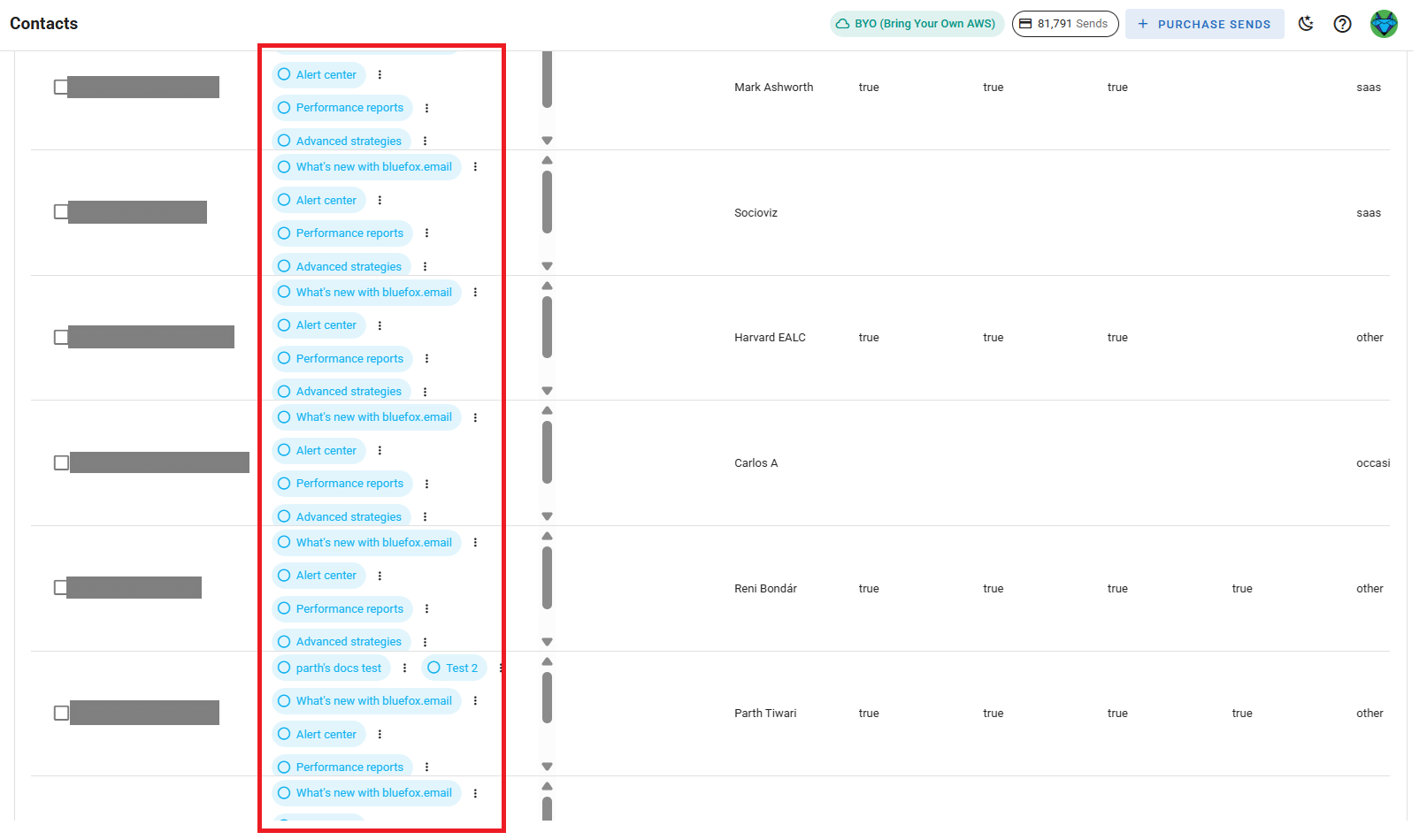
What BlueFox does. Contacts live in your project with multiple subscriber lists, segments, and per-contact attributes.
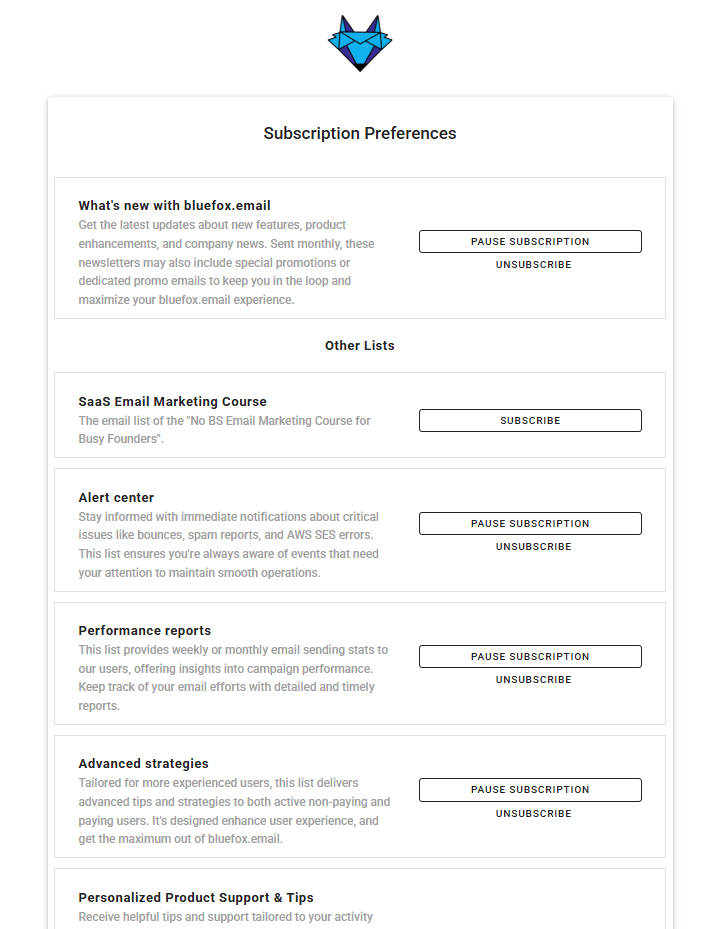
Recipients get a hosted subscription preferences page where they can manage individual lists, pause all email temporarily, or unsubscribe from everything. We add the List-Unsubscribe and List-Unsubscribe-Post headers from RFC 8058 so mailbox providers can show a one-click unsubscribe button.
Signup forms are built in the same place. You can embed them on your site, collect custom fields, subscribe someone to more than one list at once, and protect the form with an image CAPTCHA or Cloudflare Turnstile. Double opt-in is configured per form, and the verification email is one of your own transactional emails rather than something generic.
Segments, and deciding who gets this email
What email needs. You rarely want to send to everyone. You want the people who have not opened anything in ninety days, or the ones on the free plan who used a particular feature, or everyone on the list except the people who already bought.
What building it involves. SES contact lists have topics, and a topic is a subscription category rather than a filter. There is no way to ask SES which contacts opened something last month, because SES does not hold that. Engagement data lives in the event stream, so any targeting based on behaviour depends on you having already built the pipeline described later in this article, and having joined it back to individual contacts.
Once you have the data, you still need somewhere to ask questions of it. That means property conditions with real operators, equals and contains and greater than and is empty, grouped with AND and OR, and an interface a marketer can use without writing a query. It also has to stay live: a segment is a question asked at send time, not a list of contact IDs frozen on the day somebody saved it.
This is the part people underestimate most after queueing, because the first version always looks like a WHERE clause and the tenth version is a query builder.
What BlueFox does. Segments filter contacts by any property or tag, with the full set of operators and AND or OR grouping. Engagement conditions cover received, not received, opened, not opened, clicked and not clicked within a number of days you choose. A segment can apply across every contact in the project or only within one subscriber list, and the same segment works in a campaign, as an automation trigger, or as an audience filter partway through a flow.
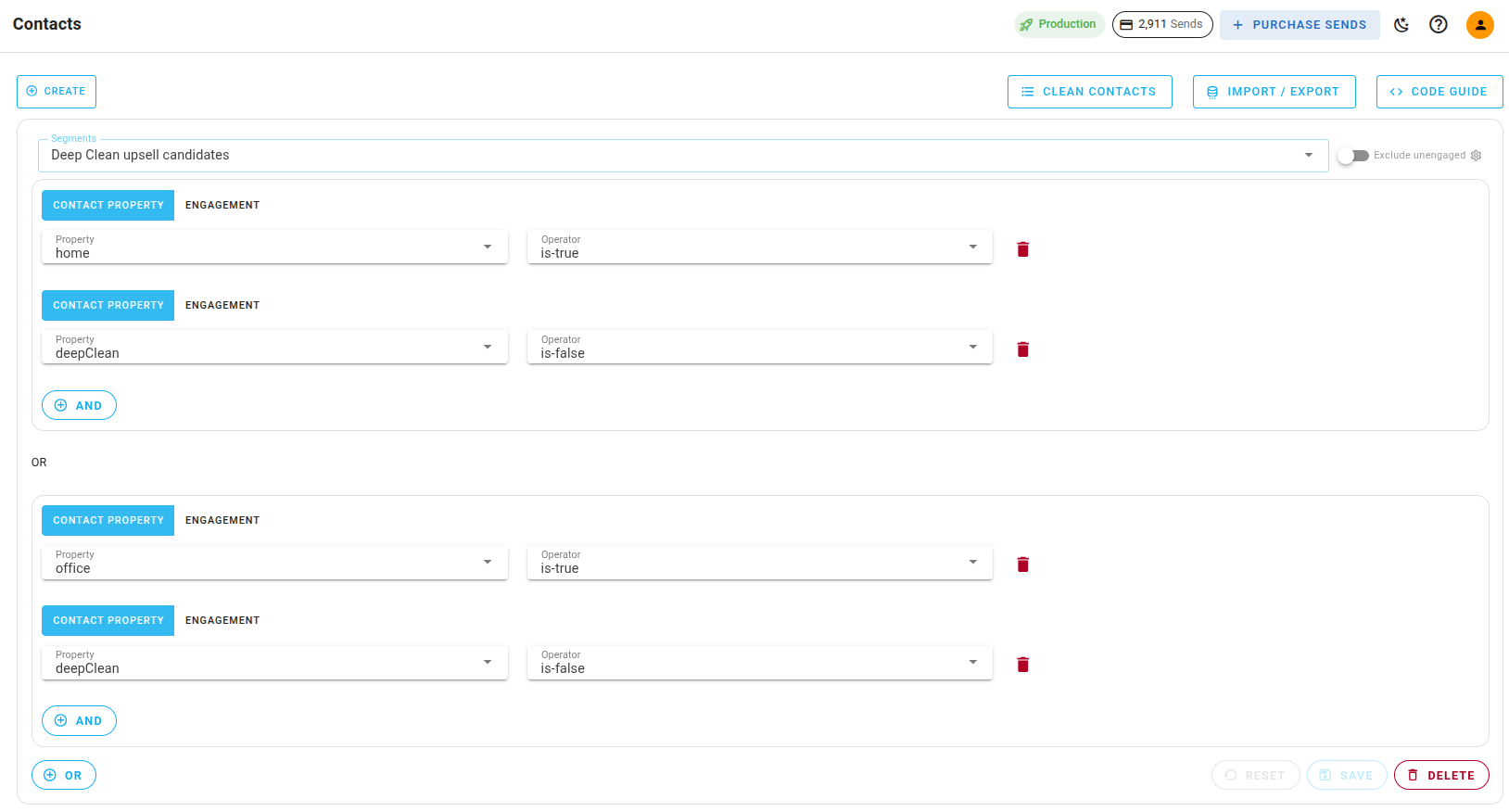
There is also a project-wide unengaged definition built on the same condition builder, which is what the exclude unengaged option uses, so you do not have to construct that exclusion yourself every time.
Bounces, complaints, and suppression
What email needs. A hard bounce or a complaint has to change what happens on your next send. Not eventually. Next time.
What building it involves. SES gives you real machinery here. There is an account-level suppression list, it records bounces and complaints, and you can add and remove addresses through the API v2 or the console. There is also a global suppression list that SES manages across all customers.
What SES does not do is close the loop back into your application. The bounce event is published to a destination you configure. From there it is yours.
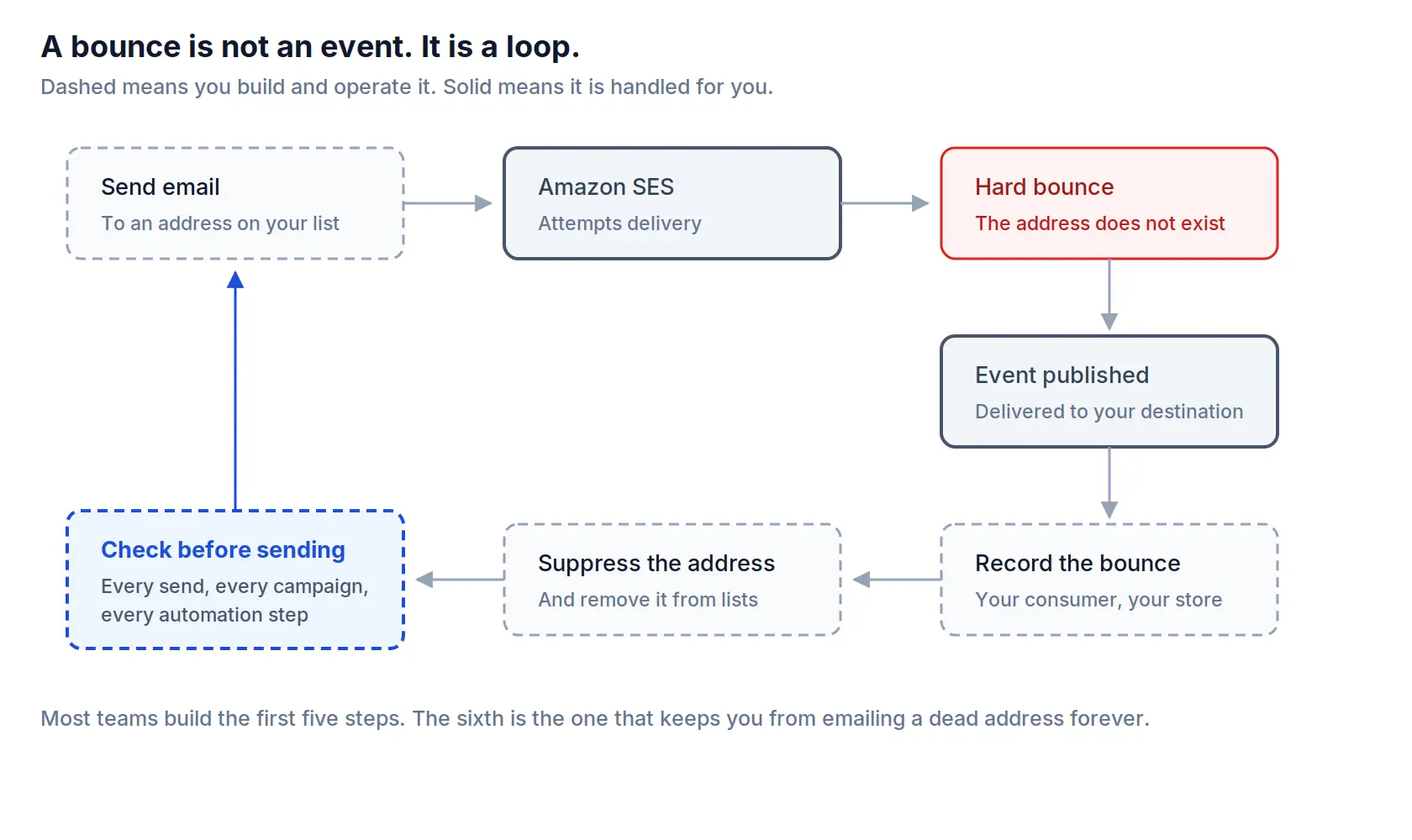
You need an endpoint that receives the notification, verifies it, acknowledges it, and does not lose events while it is being deployed. You need to record the bounce against the right contact, which means you kept enough context at send time to know who it was. You need to read the bounce type rather than treating every notification as permanent, because SES retries transient failures itself and only reports one once it has given up. And you need the check before the next send, on every campaign and every automation step, because a suppression list nobody reads is just a table.
Teams usually build everything up to recording the bounce. The step that gets skipped is the last one, applying the suppression before the next send, and it is the only one the recipient notices.
What BlueFox does. We process bounce and complaint events and record them in your analytics. Bounced and complained addresses are always added to your project's suppression list automatically, regardless of any other setting, and we check that list as part of sending.
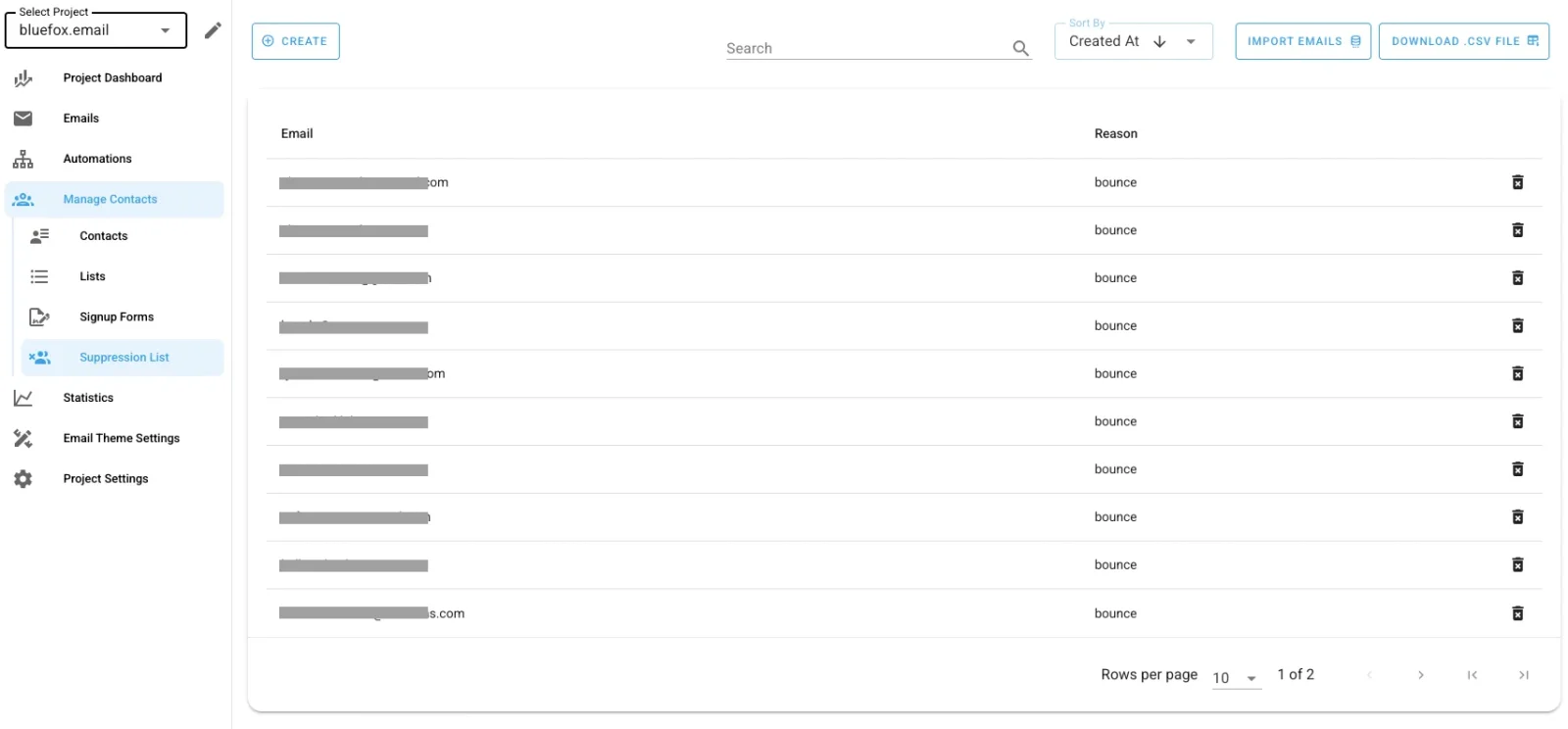
You can additionally configure whether the contact is left alone, removed from all subscriber lists, or deleted from the project entirely.
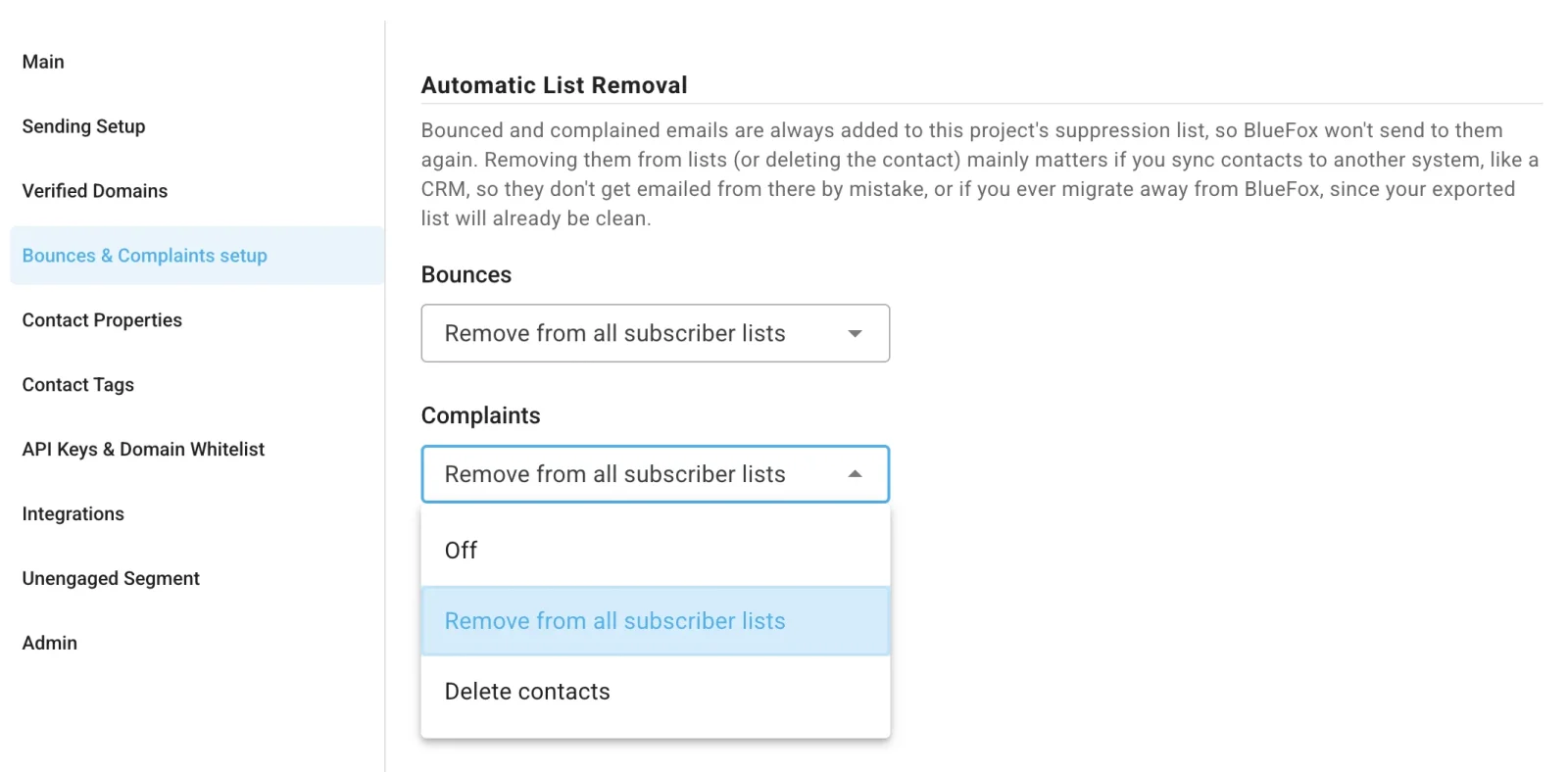
The suppression list can be imported and exported, which matters when you arrive from another platform and when you leave for one.
If you are running BYO Amazon SES, the SNS topic and subscription wiring is the one piece you still own. The full walkthrough is a good measure of how much is involved.
Analytics and event data
What email needs. Somebody wants to know how last Tuesday's campaign performed, and they want to know it without writing a query.
What building it involves. SES publishes a genuinely rich stream of delivery notifications and engagement events. Sends, deliveries, opens, clicks, bounces, complaints, delivery delays, rejects, rendering failures and subscription changes, routed to SNS, Firehose, EventBridge or CloudWatch, with up to ten event destinations per configuration set.
An event stream is not analytics. It is the raw material for analytics.
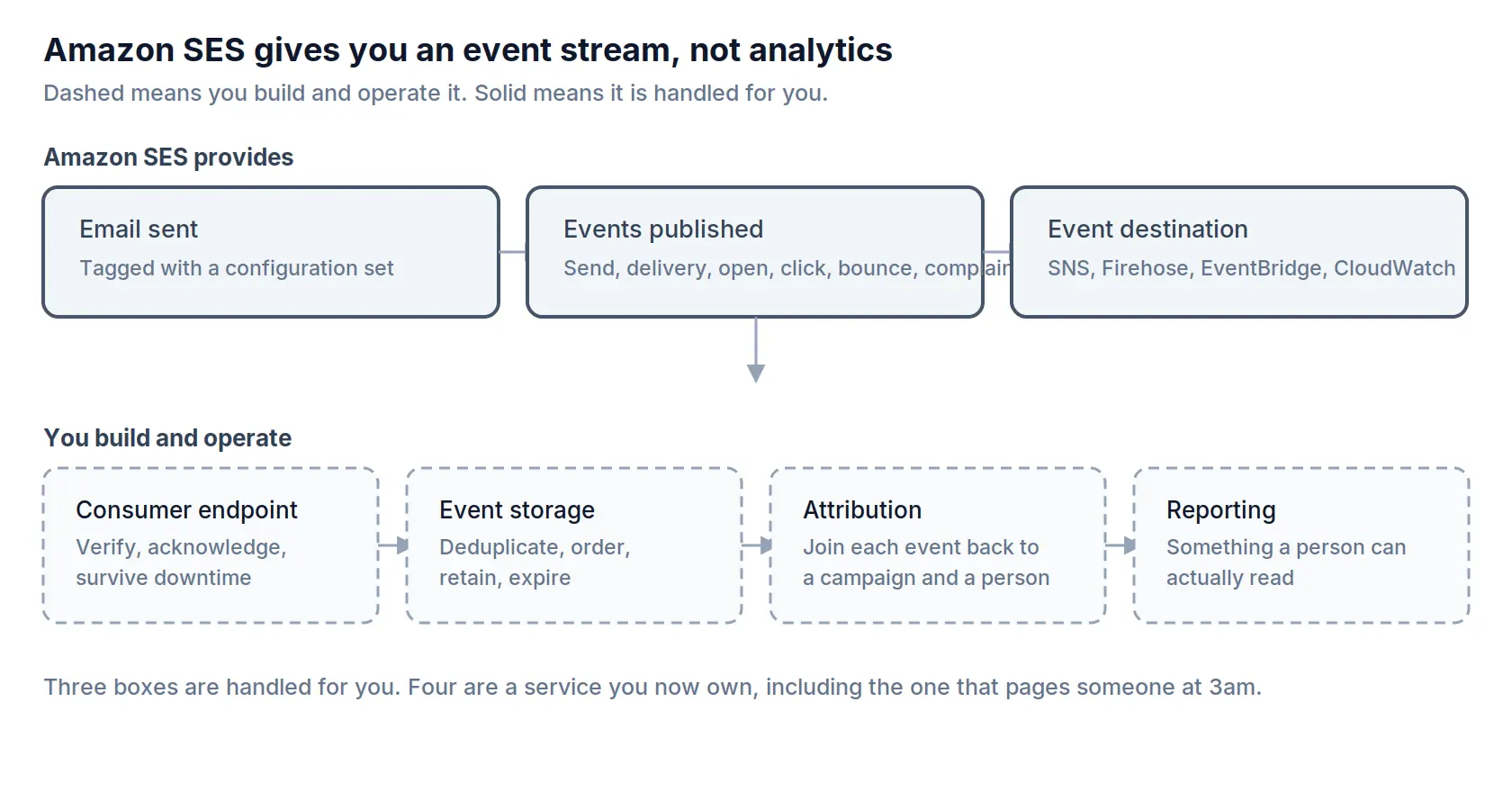
Between the stream and a number somebody can read, you build a consumer, a store, deduplication, retention, and attribution that joins each event back to a specific campaign and a specific person. That last one is the expensive part, and it has to be designed at send time, not at reporting time. Then you build the interface.
Two smaller details. Open and click tracking rewrites your links, and unless you configure a custom tracking domain, recipients see an AWS-owned domain in your emails. And SES's own deeper deliverability reporting comes through Virtual Deliverability Manager, which is a paid add-on charged per message on top of your sending cost.
What BlueFox does. Analytics for sends, bounces, complaints, opens and clicks are attached to each email, and delivery problems can also reach you through digest emails, so you are not required to watch a dashboard. Opens and clicks are tracked by BlueFox rather than by SES, so the tracking domain question above is not one you inherit.
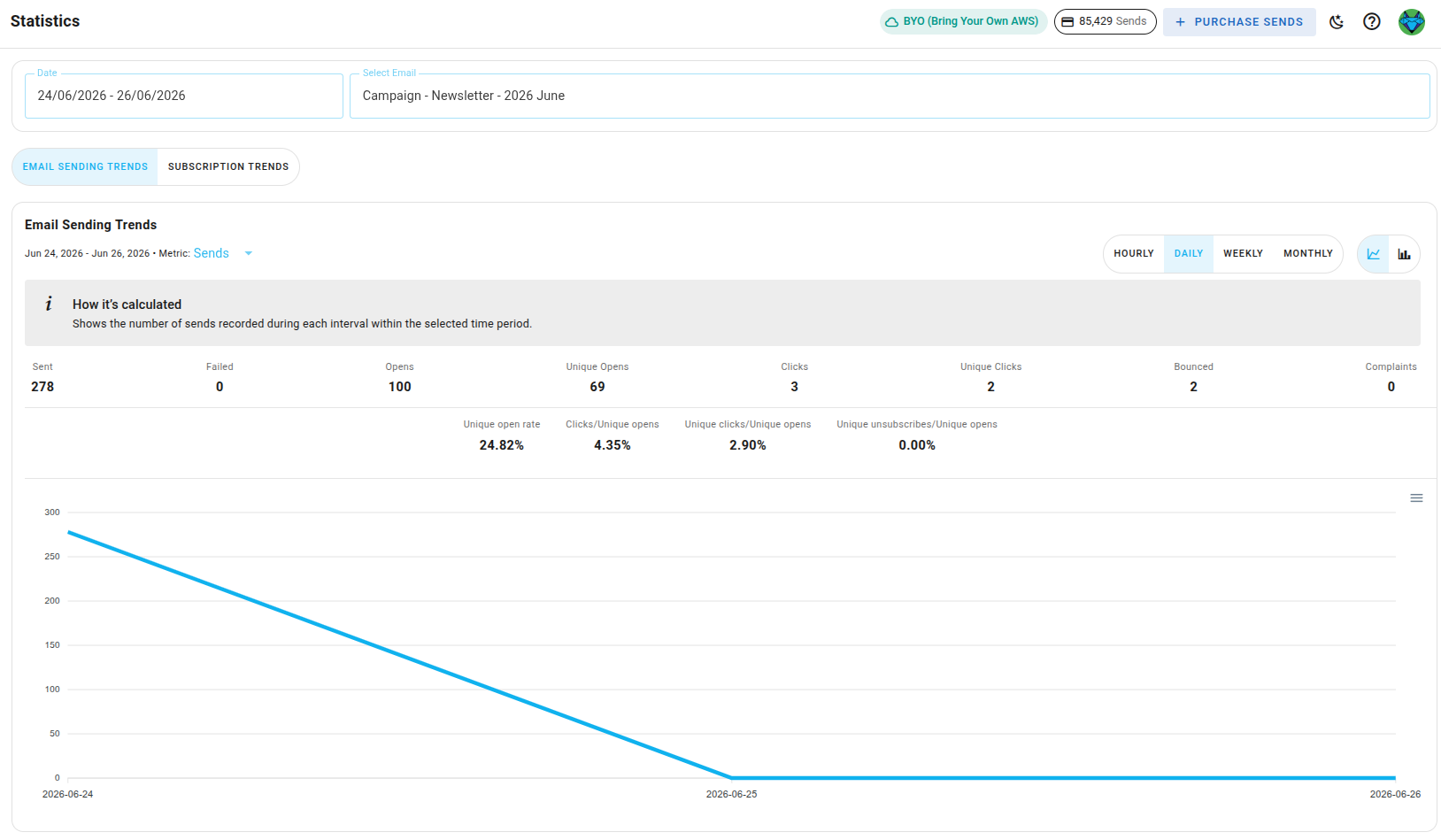
We also add Google Postmaster Tools feedback identifiers to outgoing mail, so a Gmail spam-rate warning can be traced back to the specific campaign, template or automation step that caused it. That is a gap worth understanding on its own.
Automations
What email needs. Somebody signs up, and three days later they get the second email in the sequence, unless they already converted, in which case they get a different one.
What building it involves. SES has no concept of "send this in three days." There is no scheduler, no delay step, no branch. So the flow lives in your application, and there are two costs that are easy to miss when you write the first version.
The first is visibility. When the sequence is expressed as code paths and database flags, there is no place to look to answer "what has this person received, and what is queued for them next." You reconstruct it from logs, one support ticket at a time.
The second is the change cost. A marketer asks to move an email from day three to day five. That is a code change, which means a pull request, a review, a QA pass and a release. The change itself is trivial and the process around it is not, so the request gets deferred, and the sequence stays wrong for another month.
Separating the flow from the application code is what fixes both. The flow becomes something you can look at and something you can edit, and your application goes back to reporting facts: this person signed up, this person upgraded.
What BlueFox does. Automations are defined outside your codebase, with delays, conditions and branches, and each step is a real email you can inspect.
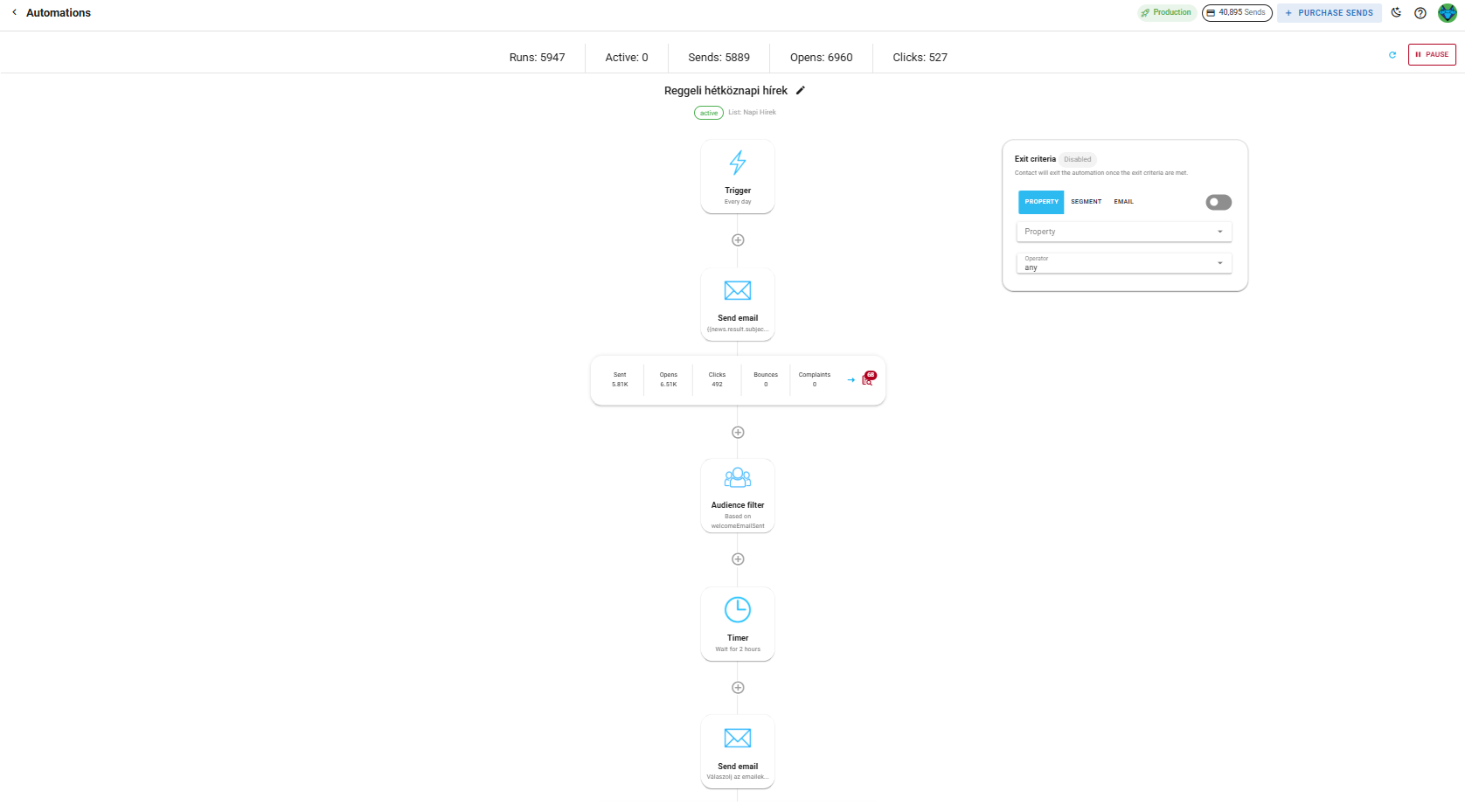
Changing the timing is a change to the automation, not a deploy. Your application keeps doing what it is good at, which is telling us what happened.
Email templates and who owns the HTML
What email needs. Emails that look consistent, and a way to change one without involving an engineer.
What building it involves. Keeping transactional HTML in your repository is a completely reasonable choice. It is versioned, it is reviewable, it sits next to the code that sends it. If you are an indie hacker, or the developer and the marketer are the same person, this is arguably the right answer and you should not let anyone talk you out of it.
It stops working when those are two different people. A marketer who wants every email to share a header cannot enforce that through pull requests they are not able to open. Templates drift, one gets updated and three do not, and eventually somebody rebuilds the same layout for the fourth time because finding the existing one was harder.
SES does have templates, with replacement values and a 500 KB limit, up to 20,000 per Region. You create and update them through the API, so there is no editor a non-developer can safely use, no preview and no review step. Sending one to a list is a separate job again, because a bulk templated send takes at most 50 destinations per call.
There is also the HTML itself. Email clients are not browsers. Outlook renders through Word, Gmail strips things it does not like, and a layout that survives everywhere is still usually built out of nested tables. Writing that well is a specialism, and every template you hand-write is one you also have to test across clients.
What BlueFox does. Templates live in a visual editor with shared structure, so the person who owns the words can change them and the emails still look like they came from the same company. The markup it produces is built for email clients, which means the rendering problem above is not one you inherit.
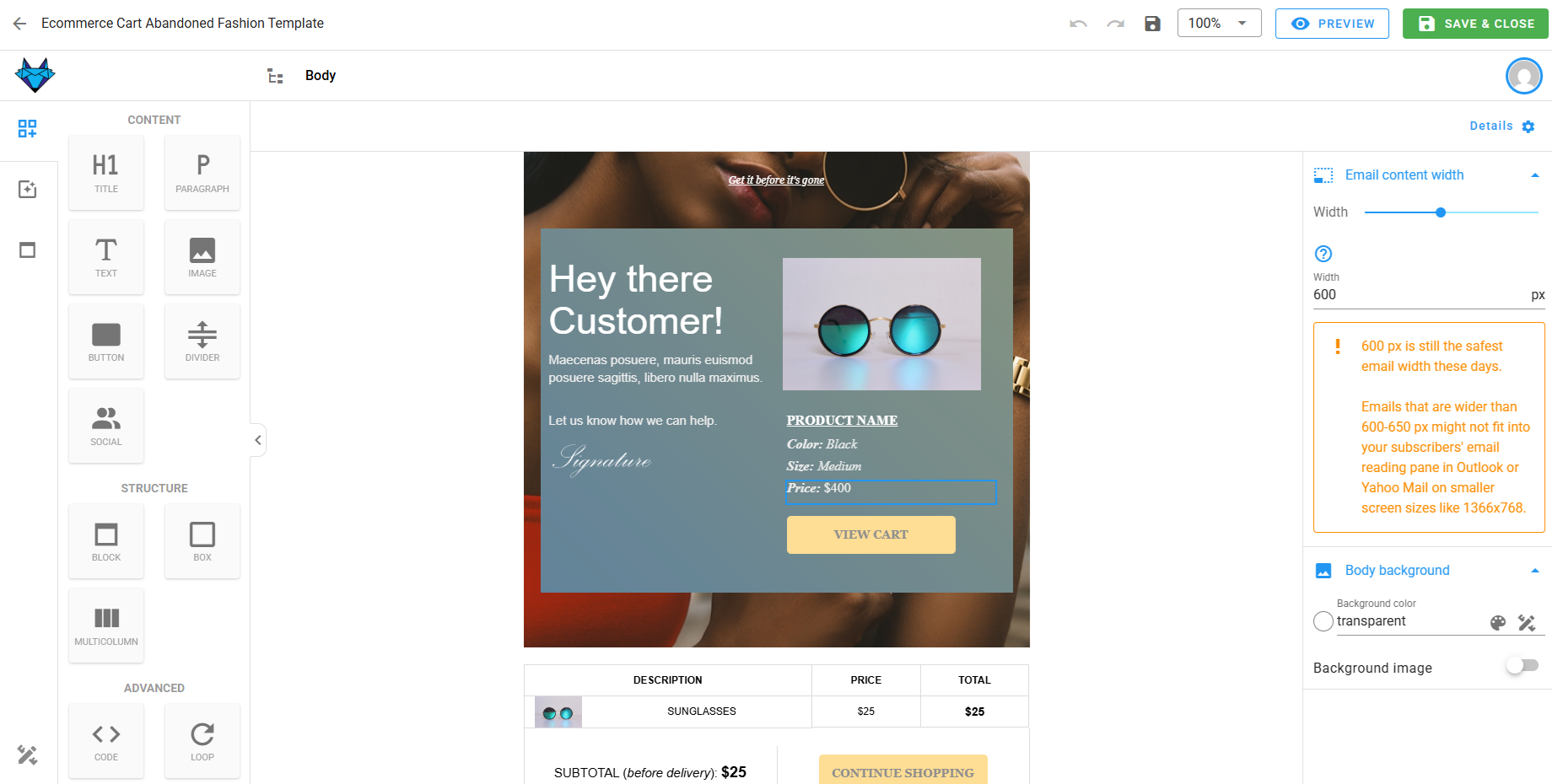
If you would rather write the HTML yourself, there is a raw HTML editor you can paste or import into, and the same merge tags and sending apply.
There is a third option that gets overlooked. Not every email should look designed. A password reset or a founder's note often lands better as something that reads like a person typed it, and a heavily styled template actively works against that. The text editor covers this case. Despite the name it still produces HTML, just lightweight HTML with minimal formatting: headings, lists, links, images, dividers and basic emphasis, and nothing else. Merge tags, data feeds and previewing work exactly as they do everywhere else.
This is a workflow question, not a capability question, and the right answer depends on who is doing the work and what the email is for.
When you should use Amazon SES directly
We would rather say this than have you find out after subscribing.
Call SES directly if most of the following are true:
- you send transactional email only, with no campaigns and no sequences
- your volume is low and steady enough that bursts never approach your sending rate
- you have a small number of templates that change rarely
- the people who write the emails are the people who deploy the code
- nobody outside engineering needs to see the numbers
In that situation SES plus a decent queue library is a few days of work, it will be reliable, and a layer on top of it is overhead you do not need. Plenty of good products send email exactly this way.
The calculation changes when a non-developer needs to send something, when a sequence needs a delay, or when the first campaign turns one instruction into twenty thousand messages. Those are the points where the work described above stops being theoretical.
What a wrapper actually is
A wrapper is what we call a layer once the thing underneath it has become boring.
Amazon SES made sending boring, in the best sense. It is reliable, it is cheap, it is well documented, and almost nobody should be building their own mail transfer agents in 2026. We are not competing with that, we are standing on it.
What is not boring yet is everything in this article. Queues that do not lose messages. Suppression that is actually checked. Segments that ask a question at send time rather than freezing a list. Automations you can look at. Templates a marketer can edit. That is the layer, and it is where our engineering time goes.
So yes, BlueFox Email is an Amazon SES wrapper. We would rather you knew exactly what is inside the wrapper before you decide whether you want it.
If you want to keep your own SES account and use BlueFox for the rest, BYO Amazon SES gives you twice the sends per pack or monthly plan at the same price, with the AWS sending cost billed to you directly. If you would rather not think about SES at all, managed sending does that instead. Either way, the delivery is Amazon's. The rest is ours.
 Parth Tiwari · Updated August 28, 2026