
Appearance
Contacts and Contact Management via the API
Legacy endpoint. New integrations should use the Contacts resource instead.
This guide explains how to manage contacts using the bluefox.email API. You can create, retrieve, update, and delete contacts from your project. Follow the examples and code snippets to integrate these functionalities into your system.
Which route to use
- Contact data (name, email, tags, custom properties): use the contact routes.
- Subscriptions (subscribe, unsubscribe, pause, activate): use the subscriber list routes.
The subscription routes accept contact fields too, but keeping the two apart avoids surprises. For example, subscribing a contact who already exists also overwrites their name and tags.
Create Contact
To create a new contact in your project, use the following URL pattern:
https://api.bluefox.email/v1/contacts/##YOUR_PROJECT_ID##Replace the placeholders with your specific information:
##YOUR_PROJECT_ID####YOUR_API_KEY##
You can find the IDs to replace by clicking on the code guide button in your contacts section:
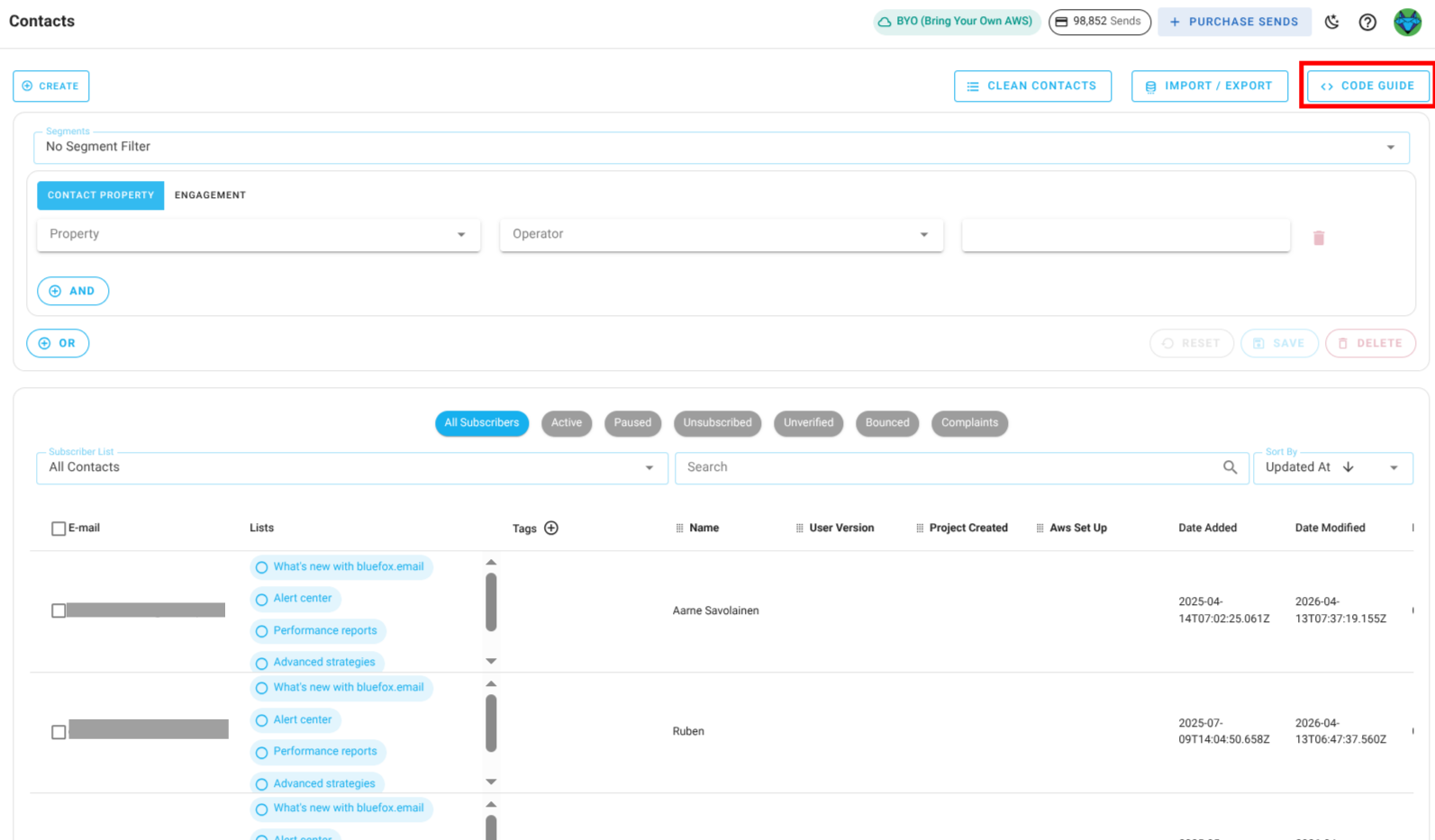
In the code guide dialog, these values are automatically filled in. If you copy the code snippets, you only need to replace the ##YOUR_API_KEY##.
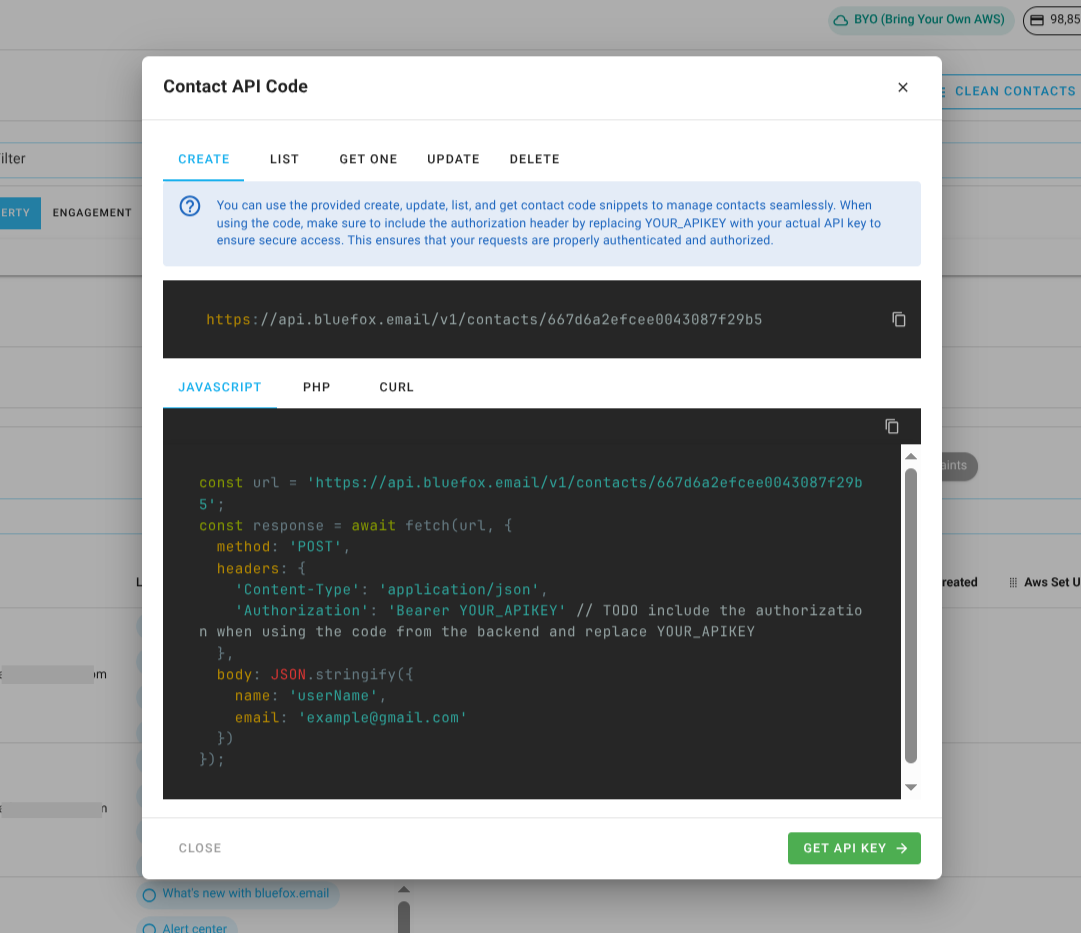
Request Body:
json
{
  "email": "jon@doe.com",
  "name": "Jon Doe",
  // Add more fields as needed
}
INFO
You can pass values for contact custom properties inside the data field in the request body. Just make sure the keys match the custom property API names defined in your project settings.
cUrl:
bash
curl -X POST "https://api.bluefox.email/v1/contacts/##YOUR_PROJECT_ID##" -H "Content-Type: application/json" -H "Authorization: Bearer YOUR_API_KEY" -d '{"name": "userName", "email": "example@gmail.com"}'Javascript:
javascript
const url = `https://api.bluefox.email/v1/contacts/##YOUR_PROJECT_ID##`;
  const response = await fetch(url, {
    method: 'POST',
    headers: {
      'Content-Type': 'application/json',
      'Authorization': 'Bearer YOUR_APIKEY' // TODO include the authorization when using the code from the backend and replace YOUR_APIKEY
    },
    body: JSON.stringify({
      email: 'example@gmail.com',
      name: 'userName',
      // Add more fields as needed
    })
});PHP:
php
$apiKey = 'YOUR_API_KEY'; // TODO: Replace YOUR_APIKEY

$url = "https://api.bluefox.email/v1/contacts/##YOUR_PROJECT_ID##";

$data = array(
  'email' => 'example@gmail.com',
  'name' => 'userName',
  // Add more fields as needed
);

$options = array(
    'http' => array(
        'header'  => "Content-Type: application/json" .
                    "Authorization: Bearer $apiKey",
        'method'  => 'POST',
        'content' => json_encode($data),
    ),
);

$context  = stream_context_create($options);
$response = file_get_contents($url, false, $context);
Security Warning
Since an API key is very sensitive information, never store it in your frontend code. Always use it from your backend.
List Contacts
To retrieve all contacts from your project, use the following URL pattern:
https://api.bluefox.email/v1/contacts/##YOUR_PROJECT_ID##Replace the placeholders with your specific information:
##YOUR_PROJECT_ID####YOUR_API_KEY##
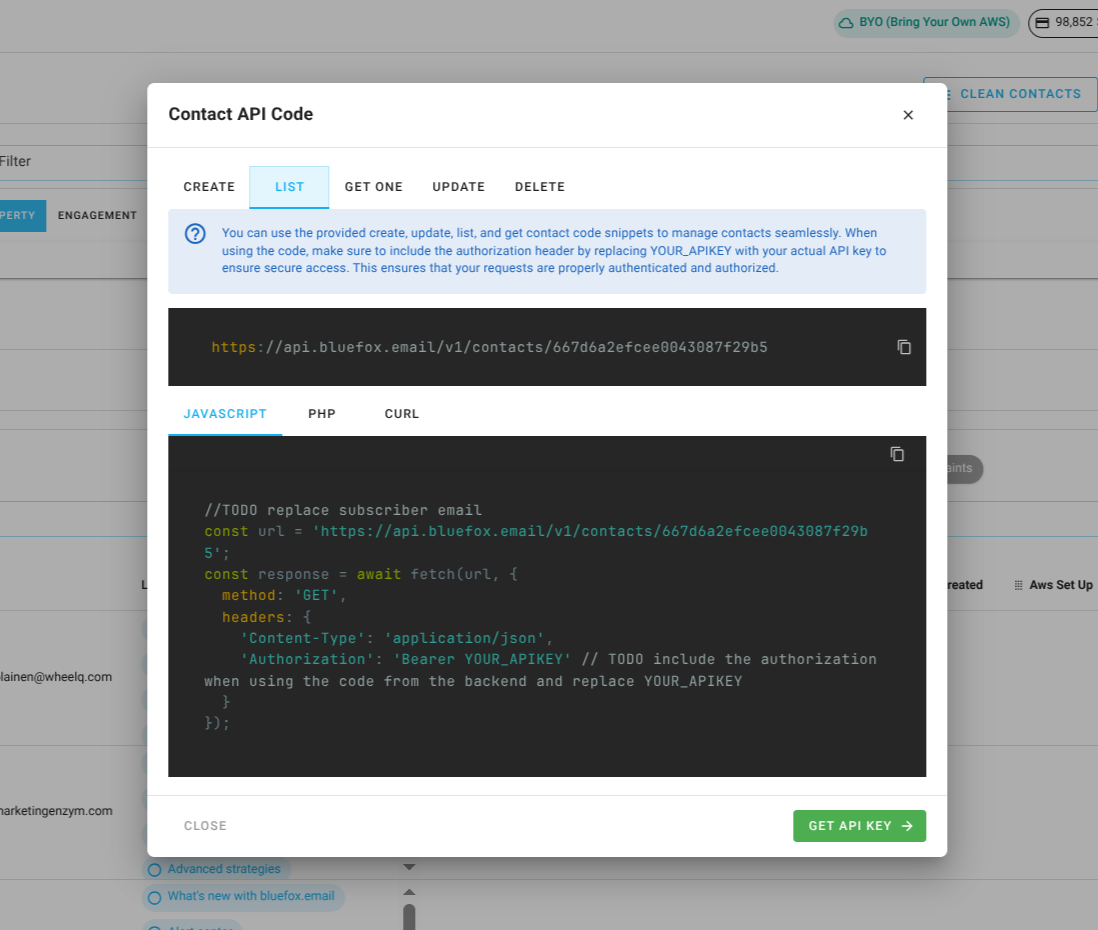
You can find the IDs to replace by clicking on the code guide button in your contacts section:
In the code guide dialog, these values are automatically filled in. If you copy the code snippets, you only need to replace the ##YOUR_API_KEY##.
cUrl:
bash
curl -X GET "https://api.bluefox.email/v1/contacts/##YOUR_PROJECT_ID##" -H "Content-Type: application/json" -H "Authorization: Bearer YOUR_API_KEY"Javascript:
javascript
const url = `https://api.bluefox.email/v1/contacts/##YOUR_PROJECT_ID##`;
  const response = await fetch(url, {
    method: 'GET',
    headers: {
      'Content-Type': 'application/json',
      'Authorization': 'Bearer YOUR_APIKEY' // TODO include the authorization when using the code from the backend and replace YOUR_APIKEY
    }
});PHP:
php
$apiKey = 'YOUR_API_KEY'; // TODO: Replace YOUR_APIKEY

$url = "https://api.bluefox.email/v1/contacts/##YOUR_PROJECT_ID##";

$options = array(
    'http' => array(
        'header'  => "Content-Type: application/json" .
                    "Authorization: Bearer $apiKey",
        'method'  => 'GET'
    ),
);

$context  = stream_context_create($options);
$response = file_get_contents($url, false, $context);
Security Warning
Since an API key is very sensitive information, never store it in your frontend code. Always use it from your backend.
Get One Contact
To retrieve a specific contact from your project, use the following URL pattern:
https://api.bluefox.email/v1/contacts/##YOUR_PROJECT_ID##/##CONTACT_EMAIL_ADDRESS##Replace the placeholders with your specific information:
##YOUR_PROJECT_ID####CONTACT_EMAIL_ADDRESS####YOUR_API_KEY##
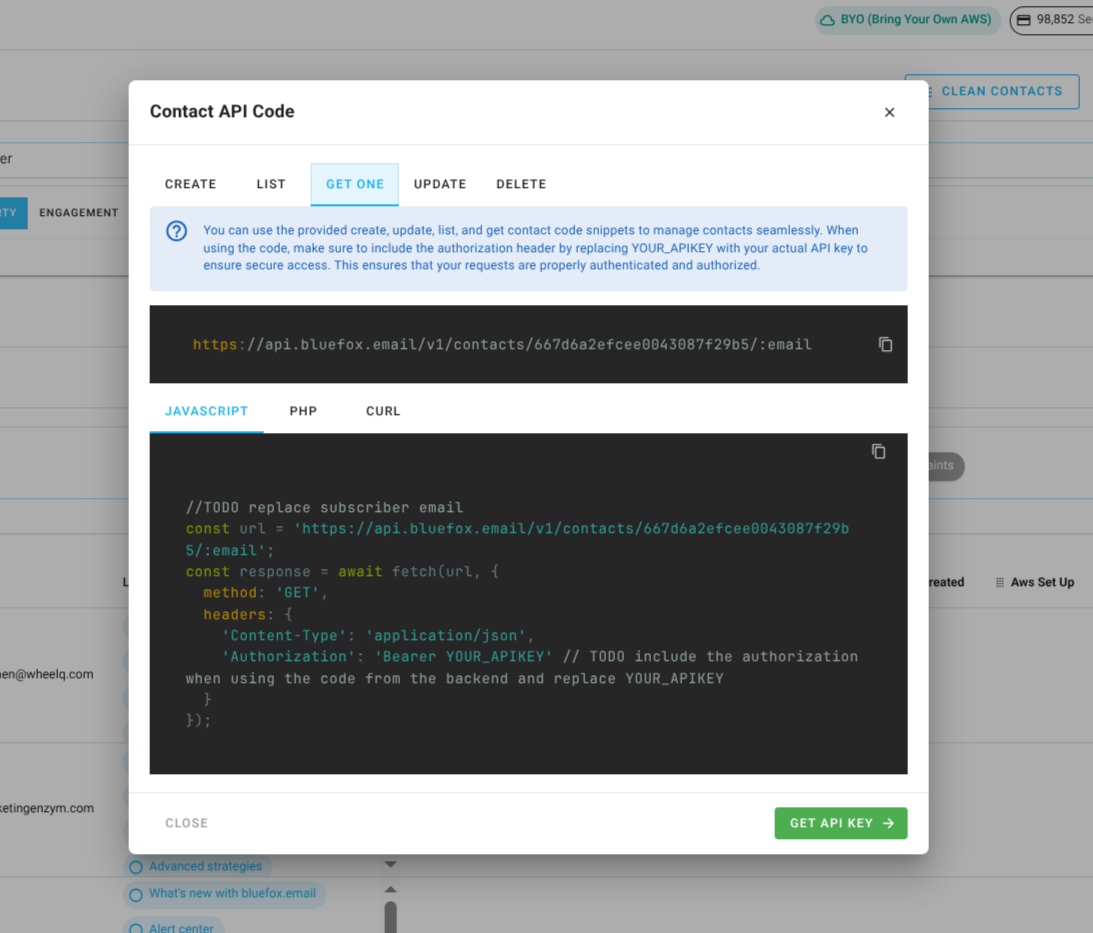
You can find the IDs to replace by clicking on the code guide button in your contacts section:
In the code guide dialog, these values are automatically filled in. If you copy the code snippets, you need to replace the ##YOUR_API_KEY## and ##CONTACT_EMAIL_ADDRESS##.
cUrl:
bash
curl -X GET "https://api.bluefox.email/v1/contacts/##YOUR_PROJECT_ID##/##CONTACT_EMAIL_ADDRESS##" -H "Content-Type: application/json" -H "Authorization: Bearer YOUR_API_KEY"Javascript:
javascript
const url = `https://api.bluefox.email/v1/contacts/##YOUR_PROJECT_ID##/##CONTACT_EMAIL_ADDRESS##`;
  const response = await fetch(url, {
    method: 'GET',
    headers: {
      'Content-Type': 'application/json',
      'Authorization': 'Bearer YOUR_APIKEY' // TODO include the authorization when using the code from the backend and replace YOUR_APIKEY
    }
});PHP:
php
$apiKey = 'YOUR_API_KEY'; // TODO: Replace YOUR_APIKEY

$url = "https://api.bluefox.email/v1/contacts/##YOUR_PROJECT_ID##/##CONTACT_EMAIL_ADDRESS##";

$options = array(
    'http' => array(
        'header'  => "Content-Type: application/json" .
                    "Authorization: Bearer $apiKey",
        'method'  => 'GET'
    ),
);

$context  = stream_context_create($options);
$response = file_get_contents($url, false, $context);
Security Warning
Since an API key is very sensitive information, never store it in your frontend code. Always use it from your backend.
Update Contact
To update a contact in your project, use the following URL pattern:
https://api.bluefox.email/v1/contacts/##YOUR_PROJECT_ID##/##CONTACT_EMAIL_ADDRESS##Replace the placeholders with your specific information:
##YOUR_PROJECT_ID####CONTACT_EMAIL_ADDRESS####YOUR_API_KEY##
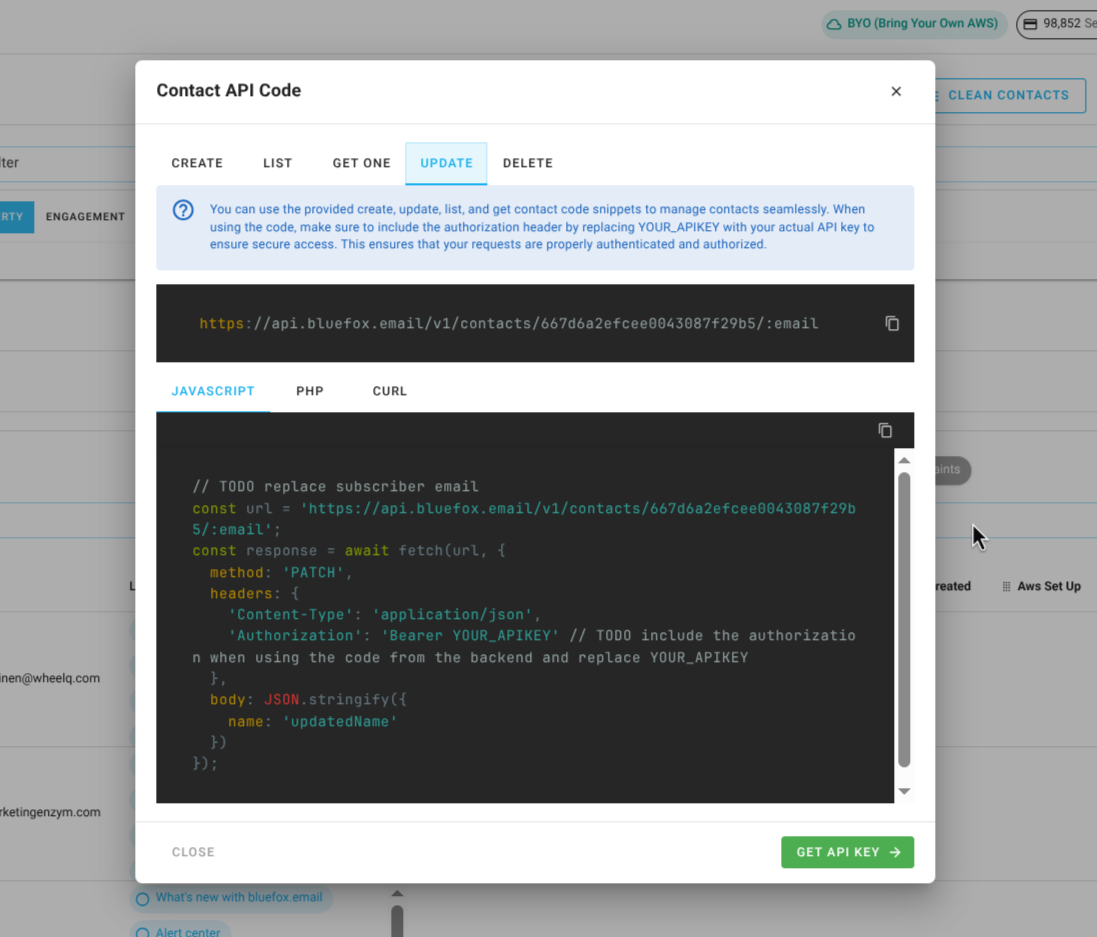
You can find the IDs to replace by clicking on the code guide button in your contacts section:
In the code guide dialog, these values are automatically filled in. If you copy the code snippets, you need to replace the ##YOUR_API_KEY## and ##CONTACT_EMAIL_ADDRESS##.
Request body:
json
{
  "email": "updated_email@gmail.com",
  "name": "Updated Name",
   // Add more fields as needed
}
INFO
You can pass values for contact custom properties inside the data field in the request body. Just make sure the keys match the custom property API names defined in your project settings.
cUrl:
bash
curl -X PATCH "https://api.bluefox.email/v1/contacts/##YOUR_PROJECT_ID##/##CONTACT_EMAIL_ADDRESS##" -H "Content-Type: application/json" -H "Authorization: Bearer YOUR_API_KEY" -d '{"name": "updatedName"}'Javascript:
javascript
//TODO replace subscriber email
  const url = `https://api.bluefox.email/v1/contacts/##YOUR_PROJECT_ID##/##CONTACT_EMAIL_ADDRESS##`;
  const response = await fetch(url, {
    method: 'PATCH',
    headers: {
      'Content-Type': 'application/json',
      'Authorization': 'Bearer YOUR_APIKEY' // TODO include the authorization when using the code from the backend and replace YOUR_APIKEY
    },
    body: JSON.stringify({
      name: 'updatedName'
    })
});PHP:
php
// TODO: Replace YOUR_APIKEY and subscriber email
$apiKey = 'YOUR_API_KEY';

$url = "https://api.bluefox.email/v1/contacts/##YOUR_PROJECT_ID##/##CONTACT_EMAIL_ADDRESS##";

$data = array(
    'name' => 'updatedName'
);

$options = array(
    'http' => array(
        'header'  => "Content-Type: application/json\r\n" .
                    "Authorization: Bearer $apiKey\r\n",
        'method'  => 'PATCH',
        'content' => json_encode($data)
    ),
);

$context  = stream_context_create($options);
$response = file_get_contents($url, false, $context);
Security Warning
Since an API key is very sensitive information, never store it in your frontend code. Always use it from your backend.
Delete Contact
To delete a contact from your project, use the following URL pattern:
https://api.bluefox.email/v1/contacts/##YOUR_PROJECT_ID##/##CONTACT_EMAIL_ADDRESS##Replace the placeholders with your specific information:
##YOUR_PROJECT_ID####CONTACT_EMAIL_ADDRESS####YOUR_API_KEY##
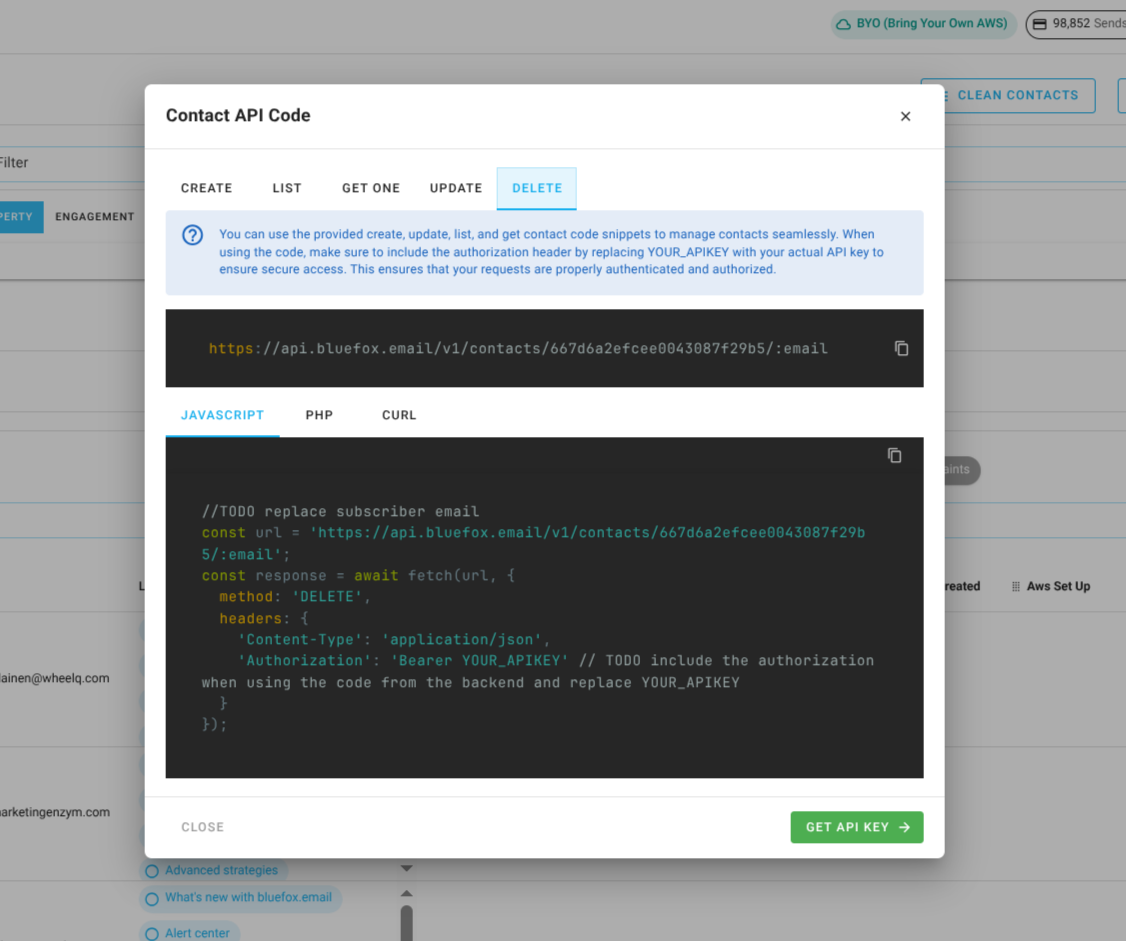
You can find the IDs to replace by clicking on the code guide button in your contacts section:
In the code guide dialog, these values are automatically filled in. If you copy the code snippets, you need to replace the ##YOUR_API_KEY## and ##CONTACT_EMAIL_ADDRESS##.
cUrl:
bash
curl -X DELETE "https://api.bluefox.email/v1/contacts/##YOUR_PROJECT_ID##/##CONTACT_EMAIL_ADDRESS##" -H "Content-Type: application/json" -H "Authorization: Bearer YOUR_API_KEY"Javascript:
javascript
const url = `https://api.bluefox.email/v1/contacts/##YOUR_PROJECT_ID##/##CONTACT_EMAIL_ADDRESS##`;
  const response = await fetch(url, {
    method: 'DELETE',
    headers: {
      'Content-Type': 'application/json',
      'Authorization': 'Bearer YOUR_APIKEY' // TODO include the authorization when using the code from the backend and replace YOUR_APIKEY
    }
});PHP:
php
$apiKey = 'YOUR_API_KEY'; // TODO: Replace YOUR_APIKEY

$url = "https://api.bluefox.email/v1/contacts/##YOUR_PROJECT_ID##/##CONTACT_EMAIL_ADDRESS##";

$options = array(
    'http' => array(
        'header'  => "Content-Type: application/json\r\n" .
                    "Authorization: Bearer $apiKey\r\n",
        'method'  => 'DELETE'
    ),
);

$context  = stream_context_create($options);
$response = file_get_contents($url, false, $context);
Security Warning
Since an API key is very sensitive information, never store it in your frontend code. Always use it from your backend.
API Responses
| Code | Name | Message | Description | JSON Response Example |
|---|---|---|---|---|
| 200 | - | - | The request was successfully processed. | json { "status": 200, "result": { "accountId": "account_id", "projectId": "project_id", "name": "name", "email": "example@gmail.com", "_id": "contact_id", "createdAt": "Date", "updatedAt": "Date" } } |
| 201 | - | - | A new contact has been created as a result of the request. | json { "status": 201, "result": { "accountId": "account_id", "projectId": "project_id", "name": "name", "email": "example@gmail.com", "_id": "contact_id", "createdAt": "Date", "updatedAt": "Date" } } |
| 400 | VALIDATION_ERROR | Email already exists. | The email address is already registered in the system. | json { "status": 400, "error": { "name": "VALIDATION_ERROR", "message": "Email already exists." } } |
| 400 | VALIDATION_ERROR | Invalid email format | The request contains improperly formatted email. Ensure email is valid email address. | json { "status": 400, "error": { "name": "VALIDATION_ERROR", "message": "Invalid email format" } } |
| 404 | NOT_FOUND | Contact not found | The requested contact does not exist in the system. | json { "status": 404, "error": { "name": "NOT_FOUND", "message": "Contact not found" } } |
| 405 | METHOD_NOT_ALLOWED | The provided email has been flagged due to bouncing. If this is incorrect and the email is valid, please contact support. | The email address has been marked as undeliverable due to previous failed delivery attempts. | json { "status": 405, "error": { "name": "METHOD_NOT_ALLOWED", "message": "The provided email has been flagged due to bouncing. If this is incorrect and the email is valid, please contact support." } } |